
Description
Adds multiple reminder times to Joplin To-Do notes.
Additional Information
| Links: | |
|---|---|
| Maintainers: | ramy.yasser21 |
| Version: | 1.1.1 |
| Minimum app version: | 3.6 |
| Downloads: This version: | 116 |
| Last updated: | 2026-08-26T16:27:30Z |
Advanced Reminder
A Joplin plugin that adds support for multiple reminder times on a single To-Do note.
Joplin's native To-Do notes only support one reminder (todo_due). Advanced
Reminder keeps its own list of reminder times per note and automatically
keeps Joplin's single native alarm in sync with the earliest one still in
the future — so a note can have as many reminders as it needs, and Joplin
still fires an alarm at the right moment every time.
Features
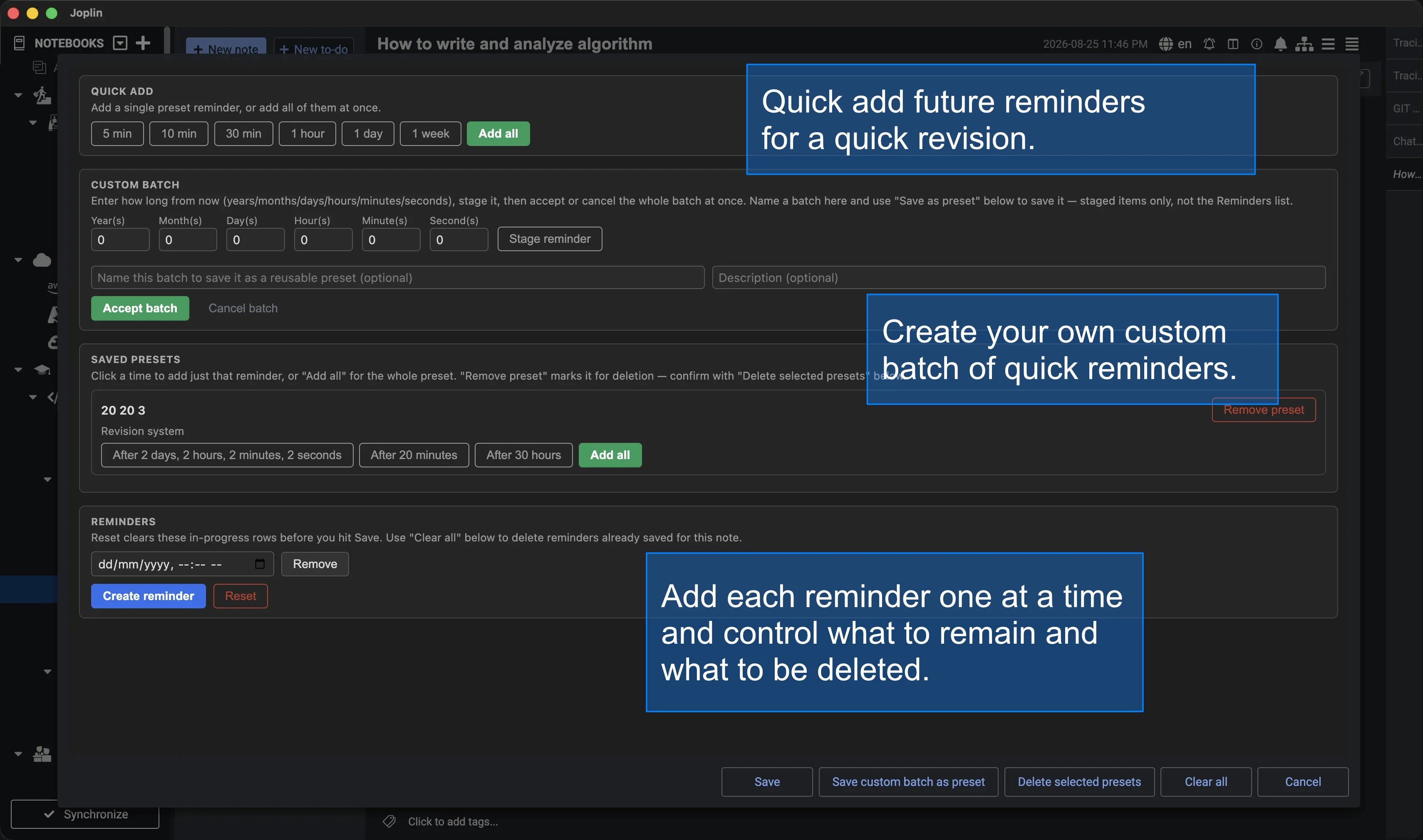
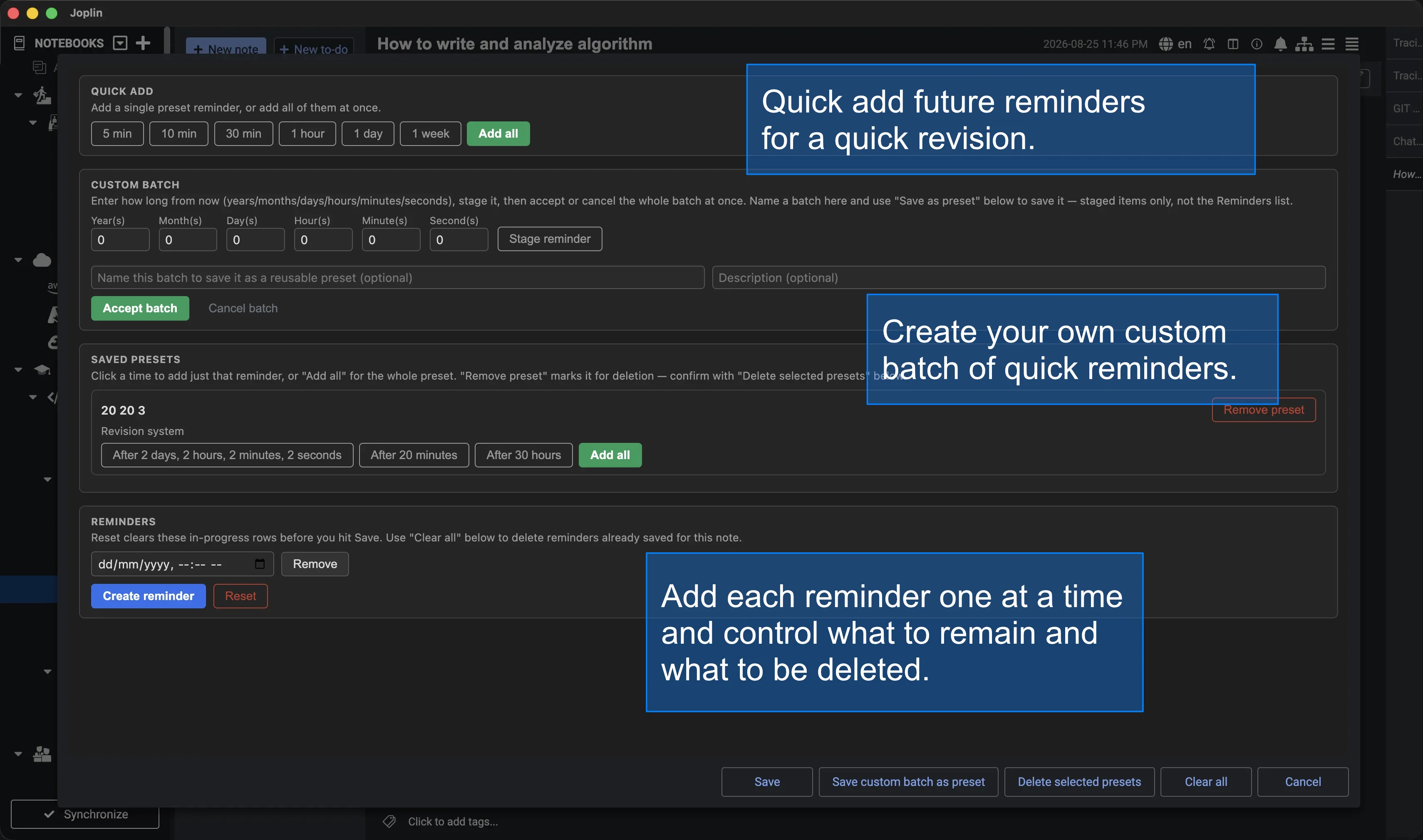
Creating reminders — four ways to build a note's reminder list, all in one dialog:
- Reminders — the note's actual list; add a blank row and pick a date/time, or edit/remove any row directly.
- Quick add — one-click preset offsets (5 min, 10 min, 30 min, 1 hour, 1 day, 1 week), individually or all at once.
- Custom batch — describe a reminder in plain terms (years / months / days / hours / minutes / seconds from now), stage as many as you like, then accept or cancel the whole batch together. Name a batch (with an optional description) to save it as a reusable preset.
- Saved presets — apply a single time or an entire saved preset with one click; remove presets you no longer want.
Keeping the list clean and correct:
- Reset clears in-progress, unsaved rows in the open dialog; Clear all deletes every reminder already saved to the note — two distinct, clearly-labeled actions so neither is a surprise for the other.
- Duplicate prevention on every creation path (single entry, quick-add, batch, saved-preset) — checked immediately as you add something, and enforced again at Save so nothing can slip through.
- Rejects reminders already in the past, zero/negative/overflowing custom durations, and non-numeric input in the duration fields, with a clear in-dialog message for each.
- Preset names and descriptions are validated and HTML-escaped before they're ever rendered back into the dialog.
Staying in sync with Joplin:
- A toolbar button / command ("Manage reminders"), enabled only on To-Do notes.
- Automatically imports a note's existing native reminder (
todo_due) into the list the first time you open the dialog on it, so nothing already set gets lost — and never re-imports it once the note is managed by this plugin, so a reminder you've cleared stays cleared. - Keeps Joplin's native alarm (
todo_due) in sync with the earliest upcoming reminder — updates it only when it actually needs to change. - When a reminder fires, automatically promotes the next one in the list, including catching up on startup if Joplin was closed when the promotion should have happened.
- Dialog respects Joplin's light/dark theme, including its own in-dialog notice banner for warnings and confirmations.
Requirements
Joplin desktop 3.6 or later.
Installation
From Joplin: Configuration > Plugins, search for "Advanced Reminder", install. Note: the version in Joplin's plugin catalog is only refreshed when a new version is published to npm — see Development if you want the latest features before then.
Manual install: download or build com.advancedreminder.joplin.jpl
(see Development below), then in Joplin go to
Configuration > Plugins > the gear/menu icon > "Install from file", and
select the .jpl. Restart Joplin when prompted.
Usage
- Open or create a To-Do note.
- Click the "Manage reminders" toolbar button (or run the command from the command palette) — it's only enabled on To-Do notes.
- Build the note's reminder list any combination of ways: add rows directly under Reminders, click a preset under Quick add, stage and accept a Custom batch, or apply a Saved preset — then click Save.
- Use Reset to discard in-progress rows before saving, or Clear all to delete everything already saved to the note. Build a reusable preset from a Custom batch with Save as preset, or remove one you no longer want.
- Joplin will alert you at the earliest upcoming time; when it fires, the next reminder in the list automatically takes over.
Development
This project uses pnpm (not npm or yarn) as its package manager, and was scaffolded with the official Joplin plugin generator. See GENERATOR_DOC.md for generator/build-framework details, and docs/ for this plugin's own architecture and feature-by-feature implementation notes.
pnpm install
pnpm test        # run the test suite
pnpm run dist     # build dist/ and publish/*.jpl
To test the built plugin without publishing, install the generated
publish/com.advancedreminder.joplin.jpl via Joplin's "Install from file",
or point Joplin's Configuration > Plugins > Advanced Settings >
"Development plugins" field at this repository's root for live development
mode.
Contributing
- Use
pnpmfor all dependency management — don't introduce apackage-lock.jsonoryarn.lock. - Run
pnpm testandpnpm run distbefore submitting a change; both must pass cleanly. - Don't commit personal editor configuration. In particular, this repo
currently has a tracked
.vscode/settings.jsoncontaining one contributor's personal window-color theming (Peacock) — if you're working in this repo, delete or gitignore.vscode/rather than committing your own editor preferences on top of it. - Follow the existing module-per-responsibility structure (see
docs/ for the architecture): pure logic stays free of any
joplinimport where possible, persistence/reconciliation/dialog code stay in their own files, and generator-managed files (api/,webpack.config.js) shouldn't be hand-edited. src/manifest.json's pluginid(com.advancedreminder.joplin) is permanent once published — Joplin's plugin repository ties it to this npm package name and will reject it if it ever appears under a different package.
License
Project Status
Actively developed past its initial scope — batching, saved presets, duplicate prevention, and input validation have all landed since the first release (see docs/00-roadmap.md for the full feature-by-feature history). Verified on Joplin desktop 3.6.15.
The npm package has been published once (joplin-plugin-advanced-reminder,
picked up by Joplin's plugin repository), but at an earlier version — the
catalog listing won't reflect the current feature set or manifest
keywords/categories until a newer version is published.