
Description
Summing up all numbers in strings, rows or cells with checked checkboxes.
Additional Information
| Links: | |
|---|---|
| Maintainers: | giicha |
| Version: | 1.0.30 |
| Minimum app version: | 3.7 |
| Downloads: This version: | 8 |
| Last updated: | 2026-10-23T11:14:56Z |






Sidebar utility for Joplin that automatically scans your active note for Markdown checklists and HTML tables containing checkboxes, summing up all numerical values in real-time. It splits metrics intelligently into Checked, Unchecked (Remaining), and Grand Total counters, providing detailed breakdowns.
The Joplin Checkbox Sum Calculator dynamically bridges text-editing with structured numerical workflows. Whenever you open or edit a note, the plugin sequentially tracks down your list tasks or table cells, runs an inline string parser to extract integers and decimals, handles localization formatting (supporting both dots . and commas , for decimals), and aggregates values cleanly inside your UI side pane.
Use Cases & Examples
Here are 5 practical ways to automate your workflows using the Checkbox Sum Calculator:
- 🛒 Smart Shopping Lists & Budget Estimators: Build dynamic tables for your upcoming purchases. Bold text parameters like screen sizes (
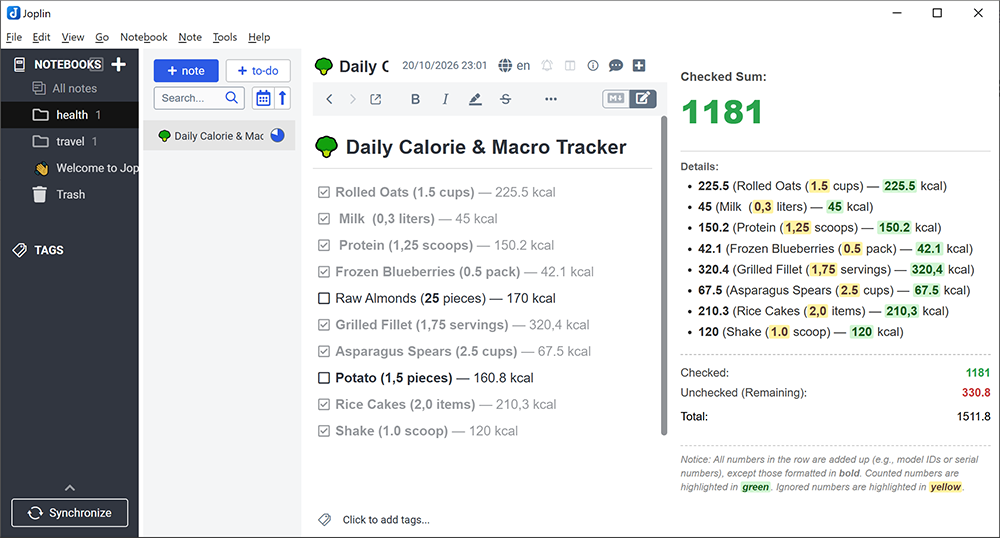
**4K**) or version tags (**v12**) to bypass calculation, and check items to instantly calculate the total cost of your active cart. - 🥦 Daily Calorie & Macro Tracker: Keep a food journal directly in your notes. Use decimal values (e.g.,
1.5servings or0,5packs) to precisely count calories, protein, or carbs as you check off what you eat throughout the day. - 💻 Freelance Billing & Time Tracking: List completed tasks with hours spent (e.g.,
4.5hours). Toggle checkboxes as tasks get approved to see the cumulative billable hours or invoice totals in real-time. - 📉 Savings Progress & Debt Paydown: Set financial milestones (e.g., Save from October bonus — 500). Check off milestones as you deposit money, letting the sidebar track your exact total savings progress.
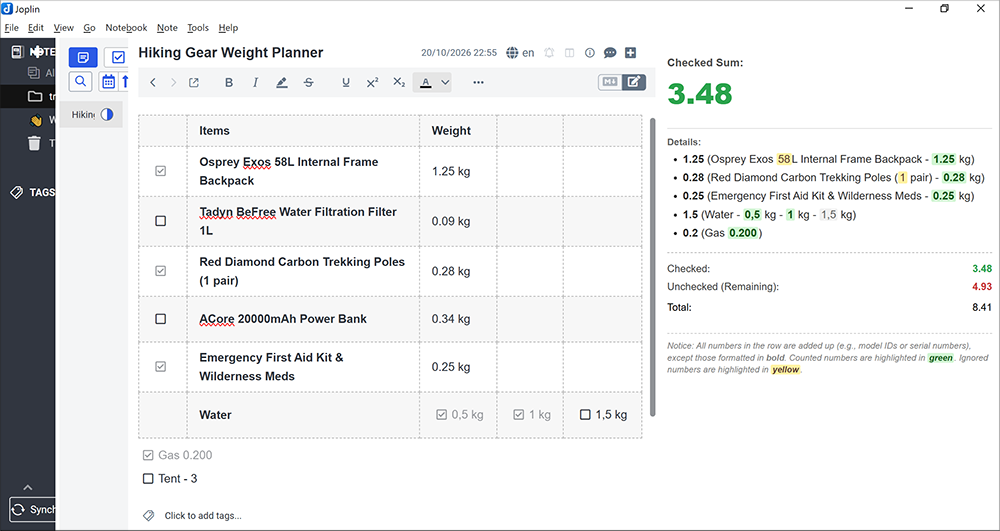
- 🗻 Hiking Gear Weight Planner: Track every gram before a big trip. List your equipment with individual weights (
0.3kg or450g). As you physically pack items into your backpack and check them, the panel updates the current total weight of your gear.
Examples & Rules
The calculator follows strict processing protocols based on structural markdown and layout formats to ensure calculations remain robust and predictable:
1. Same units required
Numbers must be in the same unit. Unit conversion is not supported yet.
2. Standard Markdown Checklists
- Counted Values: Ordinary whole or fractional numbers contained anywhere along a standard bullet list line (e.g.,
- [x] Oats — 225.5 kcal) are parsed completely. - Checked vs. Unchecked: Checked tasks (
- [x]) map directly into the Checked sum bucket. Empty checklist items (- [ ]) map directly to Unchecked (Remaining).
3. Advanced HTML Tables
Tables apply an automated structural analysis matrix tailored for tabular accounting:
- Single Checkbox Row Profile: If a row contains exactly one checkbox (either filled or empty), the state of that single checkbox dictates the mathematical fate of the entire row. If marked checked, all regular numeric cell tokens across the entire horizontal row add up into Checked.
- Multi-Checkbox Row Profile: If a row contains more than one distinct checkbox cell, the plugin flips into a hyper-granular cell-by-cell matrix layout mode. Numbers are summed into Checked strictly within cells where the checkbox is marked active. Cells holding unselected checkboxes, text strings, or no checkboxes at all flow into Unchecked.
4. Bold Number Isolation Rule
- If any number is formatted inside bold text (
**number**or__number__) or placed inside a bold cell (<b>,<strong>), the engine marks it as a system metadata bypass token. - It highlights the value in yellow inside the list views and completely excludes it from all calculations. This allows you to list sizes, years, model iterations, or dimensions (e.g.,
MacBook Pro **15-inch** — 650) without breaking your monetary or calorie math.
Installation
Method 1: Directly via the Joplin App (Recommended)
- Launch Joplin on your desktop.
- Navigate to your global configuration window:
Tools>Options(orJoplin>Preferenceson macOS). - Select the Plugins segment tab from the sidebar interface.
- Type
Checkbox Sumdirectly inside the search inputs field bar. - Click Install, then gently restart the Joplin application bootstrap to activate the panel layout.
Method 2: Manual JPL Installation via Local Repository Releases
- Navigate to the release dashboard on the official GitHub Repository.
- Download the latest compiled production binary file archive bundle:
joplin-plugin-checkbox-sum.jplfrom the assets tab. - Open Joplin's
Tools>Options>Pluginspanel menu. - Click the gear icon tool dropdown overlay located near the top and choose "Install from file".
- Select the downloaded
.jplbinary, import it, and restart Joplin.
Getting Started
Once initialized, using the plugin is immediate and seamlessly embedded inside your native layout flows:
- Look up at your primary top toolbar cluster. Click the newly added Square Checklist Plus (
+inside a box) toggle button. - The calculator's native sidebar view pane will instantly anchor onto the right side edge layout.
- Open any note containing checklists or financial spreadsheets. The plugin immediately flushes real-time metrics onto your screen:
- Checked Sum: Large aesthetic display reflecting completed values.
- Details List: A chronological text mirror highlighting matching lines, coloring items in green (counted) or yellow (ignored bold tokens).
- Analytics Summary Matrix: A flat statistical breakdown detailing your exact Checked, Unchecked (Remaining), and Total calculations.
- Infinite Height Support: If your logs grow long (e.g., tracking a full year of savings or an intensive grocery receipt spreadsheet), the pane features an integrated vertical scroll container (
overflow-y: auto) ensuring smooth scrolling access without breaking your UI.
Development
# Install dependencies
npm install

# Build
npm run dist

# Watch mode
npm run dev
The built plugin is output to the publish/ directory. To test locally, set plugins.devPluginPaths in Joplin's settings to point to the publish/ directory.
License
This repository is distributed under the terms of the MIT License. You are free to copy, modify, distribute, or use this extension setup commercially, provided the original author credits remain intact. See the LICENSE file for details.
Support the Project
If this plugin saves you time and helps you keep track of your calculations, consider supporting its further development! Any contribution is highly appreciated.
💵 USDT (TRC-20): TS1x5AR87CipqAqF3bb7sqePBKqRLFEc4Q
🪙 Bitcoin (BTC): bc1qpamcvn5le907jkt5zhhd4c2r783489nts72m8m
💎 Ethereum (ETH): 0x354dc4b9cEC4fC05021Cd26734B8cc839390e5af