Description
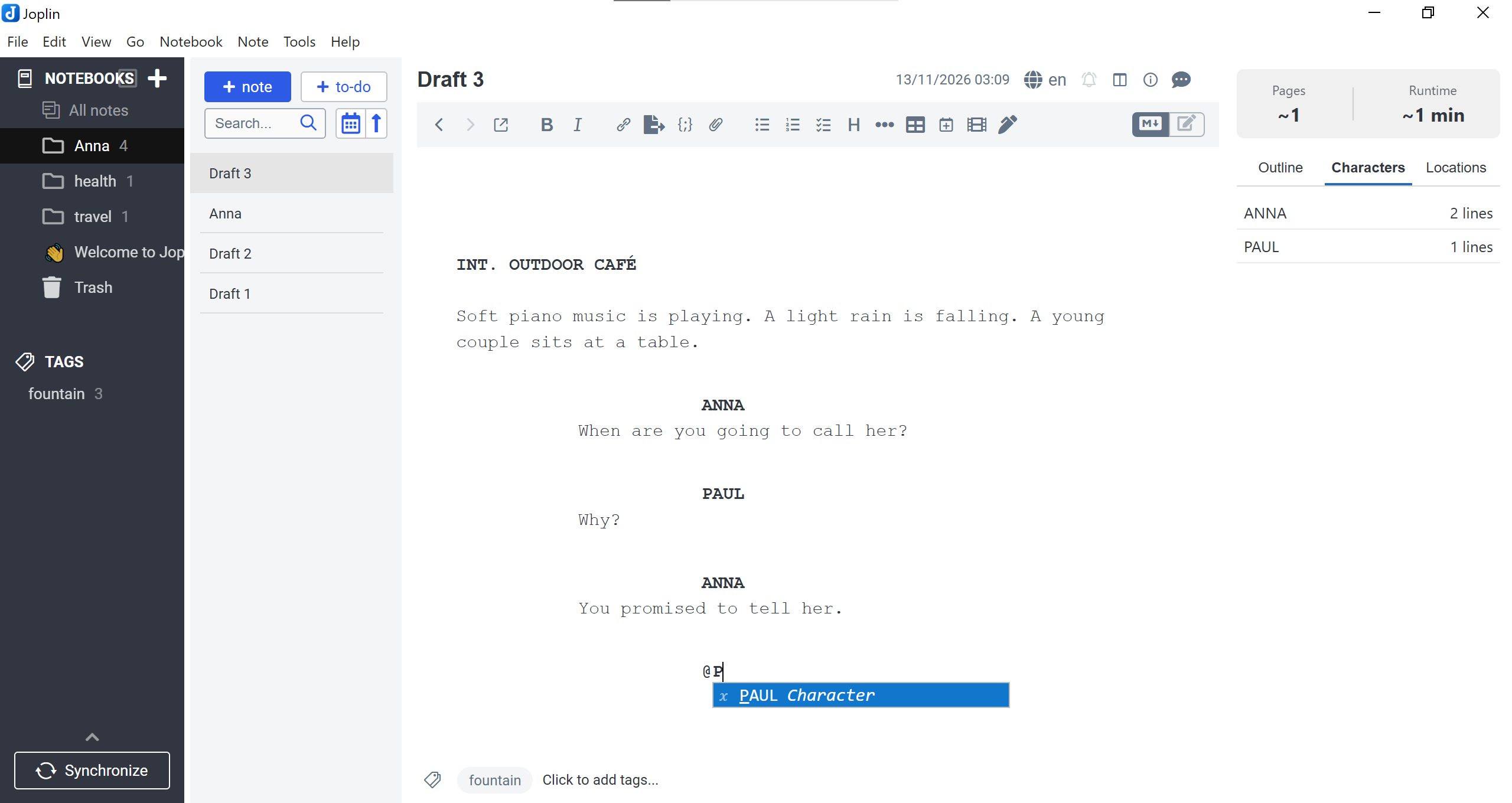
Screenwriting mode for Fountain format with Tab/Enter workflow, outline panel, and PDF export
Additional Information
| Links: | |
|---|---|
| Maintainers: | giicha |
| Version: | 1.0.7 |
| Minimum app version: | 3.7 |
| Downloads: This version: | 0 |
| Last updated: | 2026-11-13T21:09:45Z |




A screenwriting plugin for Joplin built around the plain-text Fountain markup standard. Write scripts with industry-standard visual formatting, a two-key (Tab / Enter) workflow inspired by KIT Scenarist and Story Architect (STARC), live runtime estimation, outline navigation, and US-standard PDF export.
Features
- 100% Pure Fountain Storage: Your notes stay clean, valid Fountain plain text without proprietary XML or hidden markup. Visual indentation and typography are applied dynamically inside the CodeMirror 6 Markdown editor.
- Per-Note Screenplay Mode: Toggle screenplay mode for any note with a single click on the filmstrip icon on the toolbar or via the side panel button (managed cleanly via the
fountaintag). - Two-Key Workflow (
Tab&Enter):- Cyclic
Tabon empty lines:Empty line→Character (@)→Prefix 1 (e.g., INT.)→Prefix 2 (e.g., EXT.)→Prefix 3 (e.g., INT./EXT.)→Empty line(prefixes adapt dynamically to your active language setting). Tabon existing scene headings: Cycles throughINT.→EXT.→INT./EXT.right inside an already typed scene heading.Tabon filled blocks:Character→Parenthetical (),Dialogue→Parenthetical (),Action→Transition (> CUT TO:).- Quick Dialogue
Enterworkflow: PressingEnterafter aCharacterformats the name in uppercase and jumps toDialogue. PressingEnterafter aDialogueline automatically starts a newCharacter(@). PressingEntertwice on an empty dialogue line exits back toAction.
- Cyclic
- Multilingual Scene Markers (7 Languages):
- Built-in dictionaries for English (
en), French (fr), Spanish (es), Italian (it), German (de), Russian (ru), and Ukrainian (uk). - Use a single language (e.g.,
ru) or combine multiple languages at once (e.g.,en, ruoren, uk) so older and newer scripts work side by side.
- Built-in dictionaries for English (
- Step-by-Step Smart Autocomplete:
- Scene prefixes (
INT.,EXT.,ИНТ.,НАТ.,ІНТ.,INNEN,EST., etc.). - Locations collected from the active script, other
#fountainnotes in the notebook, and project bibles. - Time of day after
-(DAY,NIGHT,ДЕНЬ,НОЧЬ,JOUR,DÍA,GIORNO,TAG, etc.). - Character names when typing
@or uppercase letters.
- Scene prefixes (
- Hybrid Project Dictionary (
#fountain-bible): Automatically gathers characters and locations from the active script, all other#fountainnotes in the same notebook, and reference notes tagged withfountain-bible. - Screenplay Side Panel:
- Sticky header with calibrated page count (
~1 page = 1 minutematched to US Letter PDF output) and runtime estimation. - Scrollable interactive Outline (Sections
#, Scene Headings, and toggleable Synopses=) with click-to-scroll navigation. - Characters list (with dialogue line counts) and Locations index.
- Sticky header with calibrated page count (
- US-Standard PDF &
.fountainExport:- Export via Note → Export → Fountain Screenplay (PDF) or Fountain Screenplay (.fountain).
- Configurable title page (
Title,Credit,Author,Source,Draft date,Contact), optional left-margin scene numbering, synopsis inclusion, and automatic saving of title metadata back to the note header. - Uses US Letter format (
1.5"left margin,1"top/right/bottom margins,12ptmonospace font) with full Cyrillic and Latin support.
Installation
Method 1: Directly via the Joplin App (Recommended)
- Launch Joplin on your desktop.
- Navigate to your global configuration window:
Tools>Options(orJoplin>Preferenceson macOS). - Select the Plugins segment tab from the sidebar interface.
- Type
scriptwriterdirectly inside the search inputs field bar. - Click Install, then gently restart the Joplin application bootstrap to activate the panel layout.
Method 2: From Release (.jpl)
- Download the latest
.jplfile from the Releases page. - Open Joplin → Tools → Options (or Joplin → Settings on macOS) → Plugins.
- Click the gear icon ⚙️ next to the search bar and select Install from file.
- Choose the downloaded
.jplfile and restart Joplin.
Method 3: Building from Source
git clone https://github.com
cd joplin-plugin-scriptwriter
npm install
npm run dist
The compiled .jpl archive will be generated inside the publish/ directory.
Usage Guide
- Switch to the Markdown Editor: Make sure Joplin is in Markdown editor mode (
M↓icon in the top-right corner of the editor), as CodeMirror plugins are active in Markdown mode. - Activate Screenplay Mode: Click the filmstrip icon on the toolbar (or click Enable Fountain Mode in the right side panel). The note will be tagged with
fountain, and the screenplay layout will activate immediately. - Create a Series / Project Bible (Optional):
Create a note in the same notebook, assign the tag
fountain-bible, and list recurring characters and locations under## Charactersand## Locations:## Characters - ALEX - MARIA ## Locations - ALEX'S APARTMENT - COFFEE SHOP - Export Your Script:
Right-click the note in the note list (or open Note → Export) and select:
- Fountain Screenplay (PDF) — configure title page fields and export a formatted PDF.
- Fountain Screenplay (.fountain) — export a clean
.fountainfile compatible with Final Draft, Story Architect (STARC), KIT Scenarist, Highland, and Fade In.
Plugin Settings
Go to Options / Settings → Fountain Screenplay to configure:
- Default Author: Pre-fills the
Authorfield in the PDF export dialog. - Default Contact Info: Pre-fills the
Contactfield in the PDF export dialog. - Scene marker languages: Comma-separated list of active marker locales (
en,fr,es,it,de,ru,uk). Example:enoren, ru.
License
This repository is distributed under the terms of the MIT License. You are free to copy, modify, distribute, or use this extension setup commercially, provided the original author credits remain intact. See the LICENSE file for details.
Support the Project
If this plugin saves you time and helps you keep track of your calculations, consider supporting its further development! Any contribution is highly appreciated.
💵 USDT (TRC-20): TS1x5AR87CipqAqF3bb7sqePBKqRLFEc4Q
🪙 Bitcoin (BTC): bc1qpamcvn5le907jkt5zhhd4c2r783489nts72m8m
💎 Ethereum (ETH): 0x354dc4b9cEC4fC05021Cd26734B8cc839390e5af