
Description
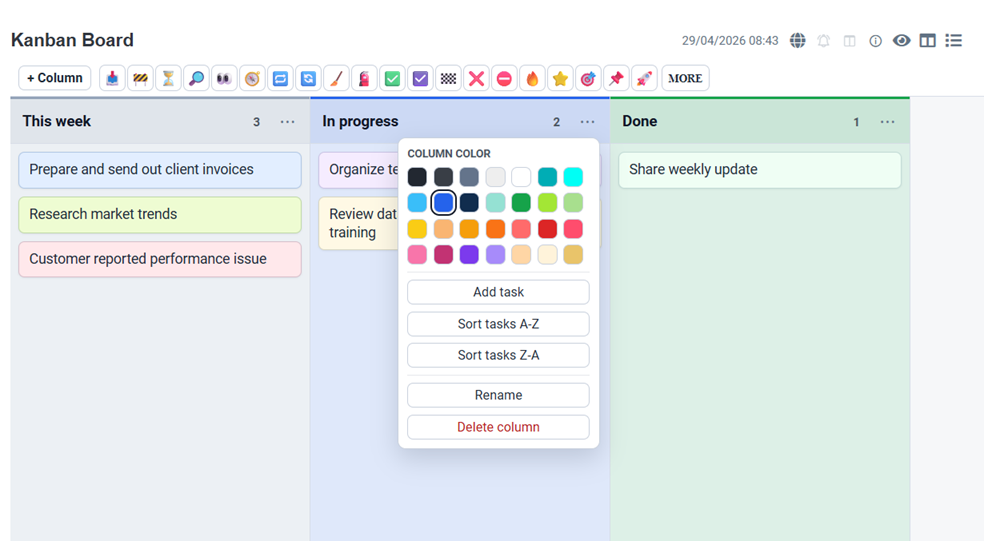
Create and edit Kanban boards directly in Joplin Markdown notes.
Additional Information
| Links: | |
|---|---|
| Maintainers: | txnam |
| Version: | 0.5.0 |
| Minimum app version: | 3.5 |
| Downloads: This version: | 625 |
| Last updated: | 2026-05-01T09:54:50Z |
JoplinKan
JoplinKan is a Joplin plugin for creating and editing Kanban boards directly inside Markdown notes. The board data stays in the note body, so the note remains readable even when the plugin is not active.
Features
- Create a starter Kanban board from the Tools menu.
- Open Kanban notes in a Joplin alternative editor.
- Use H1 headings as columns and top-level list items as cards/tasks.
- Store colors with short markers such as
[[#cffafe]]or[[red]]. - Drag cards between columns or reorder them within a column.
- Drag columns to reorder the board.
- Add, edit, delete, and color columns and cards.
- Copy Unicode icons from the editor toolbar for use in card or column text.
- Save all board changes back to Markdown.
Development
npm install
npm run build
After building, point Joplin Development Mode to this plugin root directory.
Plugin listing assets
Plugin metadata is defined in src/manifest.json. Screenshots used by the Joplin Plugins website live in docs/screenshots/, and plugin icons live in assets/.
Manifest image paths are relative to the repository root, for example:
"screenshots": [
  {
    "src": "docs/screenshots/joplin-kan-1.png",
    "label": "Simple kanban panel with drag-n-drop task"
  }
],
"icons": {
  "16": "assets/joplin-kan-16.png",
  "32": "assets/joplin-kan-32.png",
  "48": "assets/joplin-kan-48.png",
  "128": "assets/joplin-kan-128.png"
}
Keep file names and manifest paths in the same letter case so the images resolve correctly after publishing from GitHub.