
Spreadsheets for Joplin. A Joplin note can be a full spreadsheet powered by the Univer SDK — formulas, formatting, sort, filter, charts, and .xlsx import/export.
| Links: | |
|---|---|
| Maintainers: | kamleshnanda |
| Version: | 1.0.1 |
| Minimum app version: | 3.5 |
| Downloads: This version: | 87 |
| Last updated: | 2026-10-14T20:12:33Z |
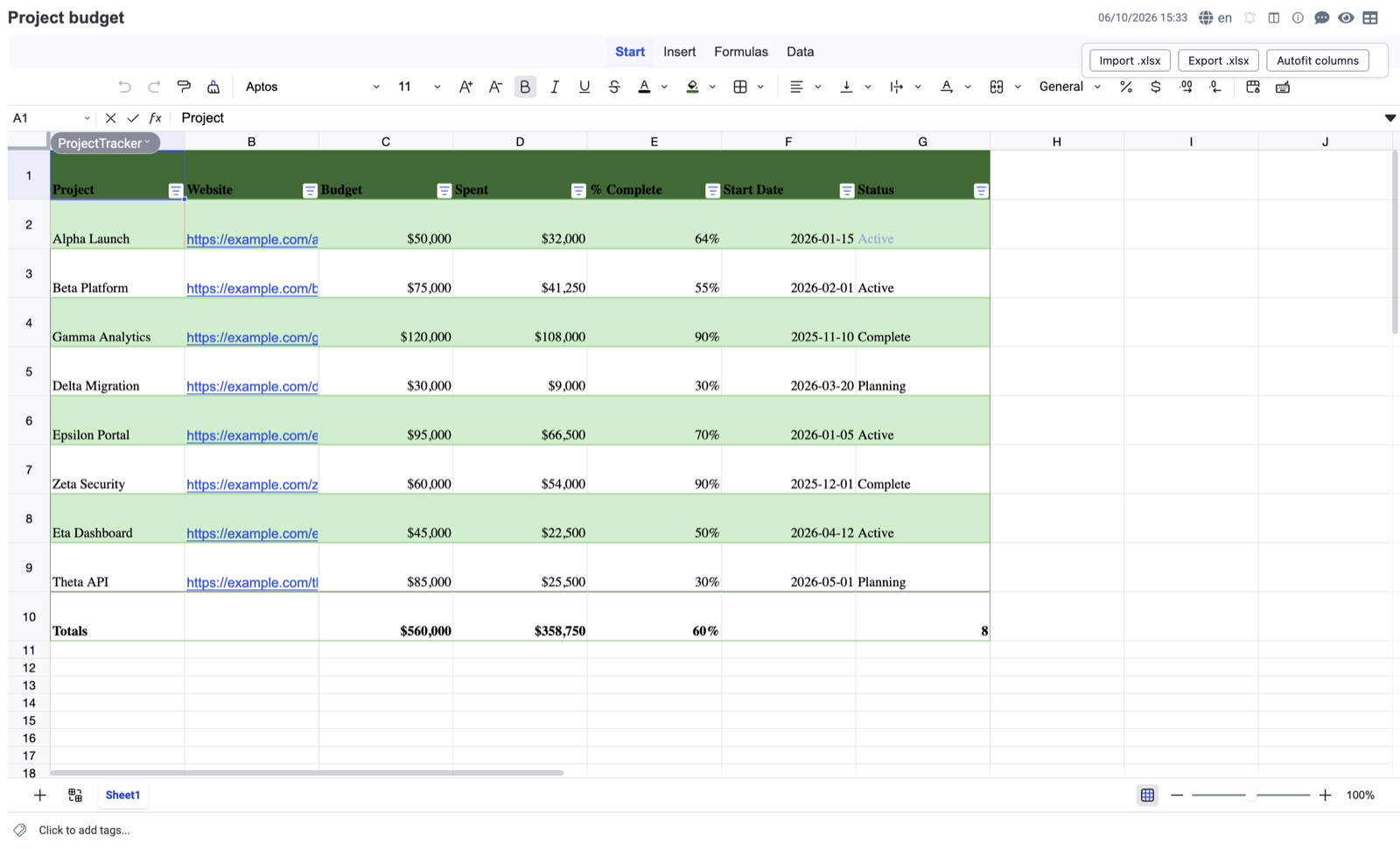
Notesheet turns a Joplin note into a real spreadsheet. Powered by the Univer SDK, it gives Joplin first-class support for formulas, formatting, sorting, filtering, named tables, conditional formatting, anchored charts, and .xlsx import / export — all inside the note editor pane you already use.
In Joplin desktop (3.5 or later), open Tools → Options (Windows / Linux) or Joplin → Preferences… (macOS), go to Plugins, search for Notesheet, click Install, then restart Joplin. Create a sheet with Tools → New Spreadsheet (Cmd/Ctrl+Shift+S), or bring in an existing workbook with Tools → Import .xlsx as Notesheet.
A new "New Spreadsheet" command (Tools menu, toolbar button, or Cmd/Ctrl+Shift+S) creates a note that opens directly in a Univer-powered spreadsheet editor. Persistence, sync, and full-text search all use Joplin's normal note storage. Notes that aren't spreadsheets open in the regular markdown editor — Notesheet adds zero overhead to non-spreadsheet notes.
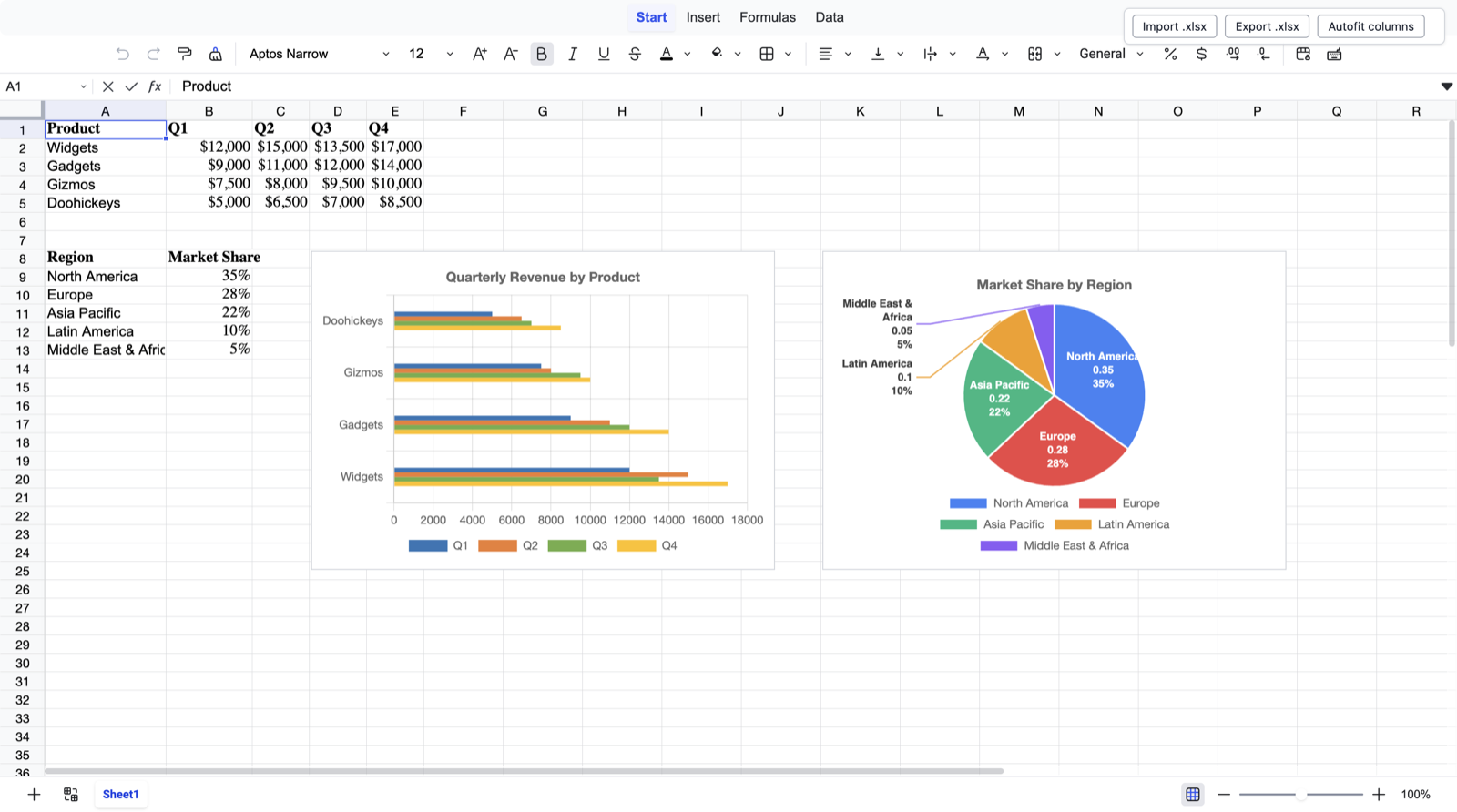
@univerjs/engine-formula) runs inside the editor. Formulas recalculate on every cell edit and on snapshot load.=Table1[[#This Row],[Investment]] resolve natively because table definitions are preserved in the snapshot and registered with Univer's formula engine on load.<a:clrScheme> (Aptos accent3 paints green, Office Classic accent3 paints grey, etc.) instead of being baked to a single hardcoded palette.Insert ribbon → Insert Chart opens a docked panel that mirrors your live cell selection. Charts are drag/resizable, pinned to the grid, and update live when source cells change. Bar / line / pie / doughnut via Chart.js (MIT). Charts export to native OOXML (xl/charts/chart*.xml) — opening the exported file in Excel produces a real Excel chart, not a screenshot — and charts authored in Excel import back into Notesheet and render live in the editor (M17). The round-trip preserves chart type, source range (including cross-sheet references), titles, legend position, axis styling, data labels, bar orientation / grouping / gap width, doughnut hole size, and per-series trendlines (linear fit drawn over the series with its equation + R² label). Pie / doughnut slice labels that don't fit inside a slice are pushed outside with leader lines, the way Excel lays them out.
Univer's own chart packages (
@univerjs-pro/sheets-chart) are commercial / require a license server. Notesheet ships a custom Chart.js + Univer drawing-preset integration instead so the floating overlay stays open-source.
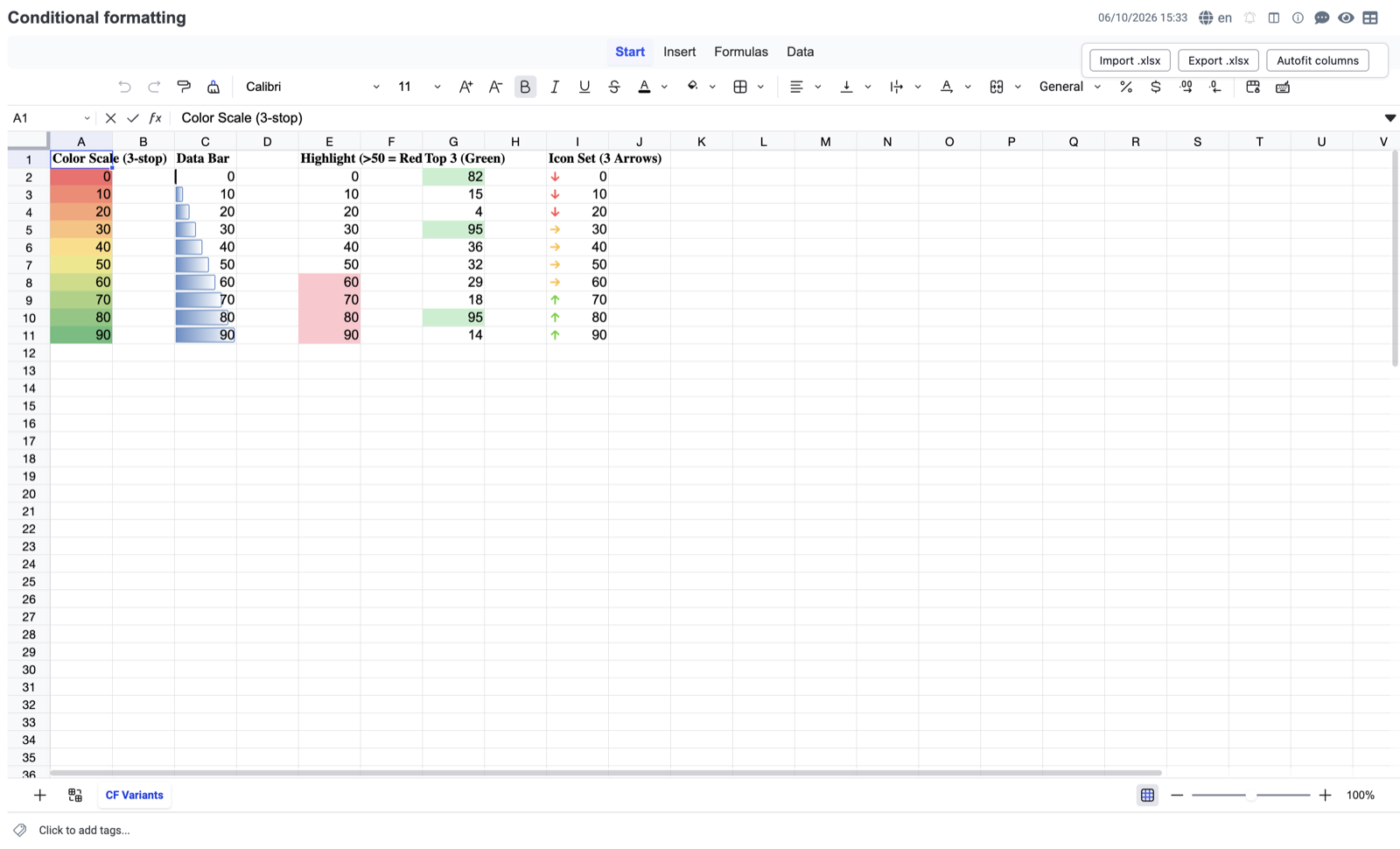
.xlsx import / export.xlsx file.{text, hyperlink} cell values and the named-Hyperlink cell style), workbook theme palette (<a:clrScheme>), conditional formatting, rich-text runs, charts (bar / line / pie / doughnut with their definitions, anchors, and trendlines), workbook default font size, and per-sheet default column width.TableStyleMediumN resolves the same accent in the exported file.A Markdown-It content script (src/contentScripts/notesheetRenderer.ts) renders Notesheet fenced bodies as inline-styled HTML tables for Joplin's preview pane and PDF / HTML export. Common Excel number formats render correctly; conditional formatting (cellIs / top-N / colorScale / dataBar) bakes into the static HTML (dataBar as a CSS linear-gradient bar; only iconSet is not yet rendered). Charts render as hand-authored inline SVG (bar / column / horizontal-bar / line / pie / doughnut) so they survive export — Chart.js canvases do not.
The rendered block is wrapped in Joplin's joplin-editable / joplin-source container (the convention built-in renderers like mermaid and katex use), so editing a Notesheet note in the Rich Text (TinyMCE) editor keeps the block atomic and round-trips the original notesheet v=1 fence back losslessly on save — without this, TinyMCE would re-serialize the rendered table to a plain Markdown table and destroy the snapshot.
.xlsx: tested against fixtures saved by Microsoft Excel and openpyxl.These are pinned by KNOWN SHORTCOMING Jest tests so accidental changes are caught.
.xlsx hyperlinks are preserved and clickable; this affects only typing a new link via the keyboard shortcut.double border style (Excel's s:7) as two 1px strokes with a 1px gap; below ~110% zoom the pair anti-aliases into what reads as one line. The border data is correct and the PDF / HTML export renders it as a true CSS double line — this is a live-canvas-only legibility quirk in Univer's renderer, not data loss. Zoom to 110%+ to see the two lines..xlsx import / export{theme: N, tint: T}) resolve against whichever <a:clrScheme> is loaded at import time. After round-trip the resolved RGB is fixed in the snapshot, so a later host-side theme change won't update the rendering.bar fallback with meta.unsupportedSourceType recording the original type; bar / line / pie / doughnut import faithfully.<xdr:sp> text boxes, rectangles, etc.) are preserve-only — not rendered inside Joplin (M18). A shape-bearing .xlsx round-trips losslessly: the shape is stored verbatim in the note, survives editor edits, and is written back to exported .xlsx so Excel renders it. But Joplin shows nothing where the shape is — neither in the Univer editor (Univer 0.23 has no native shape renderer) nor in HTML / PDF export. Images and charts do render and round-trip; only shapes are invisible-but-preserved.<a:effectLst> (e.g. a glow frame or drop shadow) round-trips losslessly: the effect XML and any crop (<a:srcRect>) are stored on the drawing and written back to the exported .xlsx, so Excel re-renders the styled frame. But Univer 0.23 has no field for image effects, so the Joplin editor shows the plain (un-framed) image. The image itself, its position, rotation, and crop are preserved and rendered; only the decorative effect frame is invisible-but-preserved..xlsx is byte-identical to the source rule. But the arrow/shape artwork Univer draws on its canvas is its own icon set, so the glyphs look slightly different from Excel's. The semantics (which icon on which cell) are correct; only the drawing style differs..xlsx) is preserved byte-for-byte on round-trip as long as the drawing is left untouched in the editor. Univer works in whole pixels, so Notesheet keeps the original EMU anchor and re-emits it exactly when the drawing hasn't moved. Two cases fall back to a pixel-grid approximation (pixels × 9525 EMU) instead, which can differ from the source by at most ~½px (3175 EMU) — visually imperceptible, and never a wrong position or crash: (1) a sub-pixel nudge in the editor (a move smaller than one pixel rounds to the same pixel, so it reads as "unmoved" and the original offset is re-emitted); (2) if a future Univer version re-splits an untouched drawing's cell + offset (representing the same position with a different cell index and offset), the exact-match check fails and the pixel-grid fallback is used. Whole-cell and pixel-level positioning are always exact; only the sub-pixel remainder is affected.xlsx-import-failed with the original error preserved in .cause.The Markdown-It renderer reads the snapshot directly without booting Univer. A few features don't have static-HTML equivalents:
linear-gradient bar).CHART_PALETTE, not per-series Excel colours (tracked separately). A chart legend lays out on a single row with no wrapping, so a chart with many series / very long labels can clip the rightmost legend entries against the SVG edge._-* #,##0.00 "kr"_- puts the symbol after the number; Notesheet's accounting formatter places it before, so the layout differs from Excel for this specific pattern._X underscore-fill (variable-width column-alignment construct) renders as a single space; numeric columns won't align as tightly as Excel's column-alignment fill.cell.v (cached value) directly. cell.v is kept fresh by Univer's formula engine in the editor — recalc happens on every cell edit and on snapshot load, then workbook.save() writes the result back. Every code path that persists a snapshot to a Joplin note goes through Univer, so a note opened in the editor at least once has up-to-date formula values. The narrow case where the renderer can show stale values: someone hand-edits the JSON inside a notesheet v=1 markdown fence and views the preview before opening the editor. Opening the note triggers a save and the next preview is correct. We deliberately do not ship a second formula engine inside the renderer (Univer's is 1.6MB minified; reimplementing 470+ Excel functions would mean two engines drifting apart over time and a multi-MB bundle on every Joplin note open).A Spreadsheet note is a regular Joplin note whose body is a Univer snapshot wrapped in a fenced markdown code block tagged ```notesheet:
```notesheet v=1
{ "id": "...", "sheetOrder": [...], "sheets": {...}, ... }
```
When the active note's body matches that shape, Joplin's editor pane shows the Univer editor instead of the markdown editor (via Joplin's Custom Editor API). The fence's v=1 marker is a forward-compatibility hook so a future on-disk format change can dispatch by version.
Requires Node.js 20+ (CI runs 20.x and 22.x).
npm install
npm run dist     # builds the .jpl into publish/
npm test         # runs Jest unit tests
The build produces publish/com.kamleshnanda.joplin-notesheet.jpl, installable in Joplin via Plugins → ⚙ → Install from file in Tools → Options (Windows / Linux) or Joplin → Preferences… (macOS).
| Milestone | PR | |
|---|---|---|
| ✅ | M0 — Rebrand to Notesheet | #1 |
| ✅ | M1 — New Spreadsheet command + snapshot fence | #2 |
| ✅ | M2 — Univer Custom Editor in Joplin's editor pane | #3 |
| ✅ | M3 — Formatting (Univer core preset) | — |
| ✅ | M4 — Sort & Filter | #4 |
| ✅ | M5 — .xlsx import / export |
#5 |
| ✅ | M6 — Named tables | #6 |
| ✅ | M7 + M8 — Anchored Chart.js charts | #8 |
| ✅ | M9 — Excel structured-references + table fidelity + borders | #9 |
| ✅ | M10 — Chart export to .xlsx (native OOXML) |
#13 |
| ✅ | M11 — Dependency hygiene | #12 |
| ✅ | M12 — Formatting fidelity polish | #14 #15 |
| ✅ | PGE — Planner-Generator-Evaluator harness | #17 |
| ✅ | M13/C — Rotated text round-trip | #19 |
| ✅ | M13/D — Rich-text within a single cell | #20 |
| ✅ | M13/E — Theme-aware banding accuracy | #22 |
| ❌ | M14 — SheetJS Community migration spike (NO-GO; see docs/m14-sheetjs-spike.md) |
#24 |
| ✅ | M15 — Conditional formatting full round-trip | #26 |
| ✅ | M16 — Snapshot → HTML for Joplin's PDF / HTML export | #28 #29 #30 #31 |
| ✅ | M17 — Chart import from .xlsx (chart definitions + trendlines + pie leader-line labels) |
#32 #33 |
| ✅ | Roadmap & backlog grooming — collect M0→M17 pending scope (BACKLOG.md); split into M18–M20 |
#34 |
| ✅ | Dev guidelines & repo-rules cleanup — consolidate contributor/agent guidelines (CONTRIBUTING.md, AGENTS.md) and add enforcement (ESLint + Prettier + typecheck + dependency-downgrade guard, wired to pre-commit hooks and CI) |
#35 |
| ✅ | M18 — Drawings & charts: charts in HTML / PDF / preview export; image .xlsx round-trip; shape (<xdr:sp>) preserve-only .xlsx round-trip; Rich Text editor fence data-loss fix; chart-importer sheetId-drift fix — backlog groups A–C |
#36 #37 #39 #40 |
| ⏳ | M19 — Static-render & import gaps: iconSet / rich-text in HTML export, accounting number formats, multi-table workbooks, theme-tinted borders, Univer keybinding bugs — backlog groups D–E | planned |
| ✅ | M20 — Codebase health: production npm audit → 0 (scoped uuid / nanoid overrides; webview bundles exceljs from source so the uuid fix reaches the editor), lint-staged 16, override guard test, webview import harness — backlog group F |
#44 |
| ⏳ | M21 — In-cell (rich-value) image .xlsx round-trip: import Excel "Place in Cell" images (richData/_localImage) as native Univer cell images (fixes #VALUE! placeholder), and regenerate the richData/metadata parts on export |
planned |
| ✅ | M22 — Marketplace readiness: .jpl 13.7 → 9.3 MB (unused Univer hyphenation dictionaries stubbed), plugin icon / screenshots / promo tile in the manifest, npm package metadata, MIT LICENSE file |
#41 #42 |
npm install and npm audit print warnings for transitive packages buried under our direct deps. We fix what we can at the root, and document the rest rather than mask it. As of M20, npm audit --omit=dev reports 0 vulnerabilities.
package.json overrides (M20) — two scoped pins for upstreams that can't ship the fix themselves:
exceljs → uuid 11.1.1 (GHSA-w5hq-g745-h8pq). exceljs 4.4.0 is the latest release and still asks for uuid ^8.3.0, and upstream has been inactive since 2024-01. exceljs only calls v4() with no arguments, and that API is unchanged in uuid 11. For the override to reach the editor, the webview bundle compiles exceljs from lib/exceljs.bare.js rather than its prebuilt dist/exceljs.min.js, which has uuid 8 baked in. The polyfills and stubs that this needs are in webpack.config.js → exceljsFromSourceResolve(). Live-verified by webview import → export (x14 dataBar ids) → re-import with scripts/pge/eval-import.js and eval-export.js. It also shrank the .jpl by 0.6 MB.@univerjs/core → nanoid 5.1.16 (GHSA-28wg-ghj8-5hjv). Univer 0.23 pins nanoid exactly at 5.1.11, and npm's only suggested fix was Univer 1.x, a major upgrade that's planned as its own milestone. 5.1.11 → 5.1.16 keeps the default alphabet and size, so IDs that Univer saves in snapshots keep the same format.uuid pin would downgrade the uuid 13 that @univerjs-pro/collaboration uses, and a global nanoid 5 pin would break postcss, which needs ^3.sprintf-js via argparse@1 → js-yaml@3 → @istanbuljs/load-nyc-config; 20 moderate findings). This only affects the test runner, and no fixed sprintf-js exists. npm audit suggests jest 25, a major-version downgrade, which our rules don't allow. Accepted until istanbul drops js-yaml@3.inflight@1, rimraf@2, lodash.isequal, glob@7.x × 4, fstream@1, glob@10.x × 3) — every entry is buried under exceljs (>archiver, >unzipper, >fast-csv) or jest internals. M11 already bumped jest to 30 to drop the deprecated transitive globs we could; the rest are upstream noise we can't act on from package.json without making something worse.glob@11.1.0 (our direct devDep) — npm warns about "old versions of glob" for any glob; glob@11.1.0 IS the current major. Ignore..xlsx parserexceljs@^4.4.0 is the foundation of src/xlsx.ts. The M14 spike evaluated migrating to SheetJS Community and ruled NO-GO; full evidence is at docs/m14-sheetjs-spike.md. The migration becomes worth re-evaluating only if (a) SheetJS Community proper (xlsx) adds first-class cell-style read support upstream, or (b) exceljs is publicly archived. Until then, the xlsx-js-style fork's parser-level loss of borders, alignment, rotation, and most font formatting on Excel-imported workbooks would directly regress shipped features.
Jest unit tests cover the snapshot-data shape but cannot catch the failure mode where the data is correct and Univer's renderer ignores it. The planner-generator-evaluator harness adds a runtime visual gate on top of Jest:
OPERATOR_ASK.md into BUILD_PLAN.md with per-feature acceptance criteria phrased as user-observable outcomes.passes: false row from test-results.json, builds the feature, captures a screenshot from the running Joplin desktop app, and only then flips its row.Each evaluator screenshot is paired with a <screenshot>.pixels.json sidecar holding the top non-background colours sampled from the Univer canvas, so colour-sensitive assertions can be machine-checkable.
# Joplin dev profile only — never touches your main profile.
./scripts/pge/launch-joplin.sh        # starts Joplin --env dev with CDP on :8315
./scripts/pge/install-plugin.sh       # builds + copies the .jpl into the dev profile
./scripts/pge/run-cycle.sh            # one PGE cycle: generator → evaluator
.claude/CLAUDE.md — generator runtime contract.claude/agents/{planner,generator,evaluator}.md — agent briefs.claude/hooks/verify-gate.sh — denies Write to test-results.json until evidence is Readscripts/pge/eval-screenshot.{sh,js} — Playwright + CDP attach, frame drop into the editor's UserWebviewIndex.html iframe (where Univer mounts), wait on canvas[id^="univer-sheet-main-canvas"], screenshot + pixel sidecarscripts/pge/run-cycle.sh — orchestrator (one cycle per invocation, no auto-loop)BUILD_PLAN.md / OPERATOR_ASK.md / PROGRESS.md / AUDIT.md / test-results.json — operator-readable harness statescreenshots/<feature-id>/ — committed visual evidence per feature (both the generator's drop and the evaluator's authoritative captures)--env dev → ~/.config/joplindev-desktop/). The harness never touches the operator's main Joplin profile.test-results.json defaults every row to { passes: false }. A verify-gate hook denies any Write to that file until the agent has first Read a screenshot.claude subprocess and has only Read / Glob / Grep / Bash — no Write, no Edit, so it cannot quietly fix problems instead of reporting them.Pattern adapted from anthropics/cwc-long-running-agents.
MIT. Bundled libraries: Univer SDK is Apache-2.0, exceljs is MIT, Chart.js is MIT, JSZip is MIT-or-GPLv3 (used under MIT).