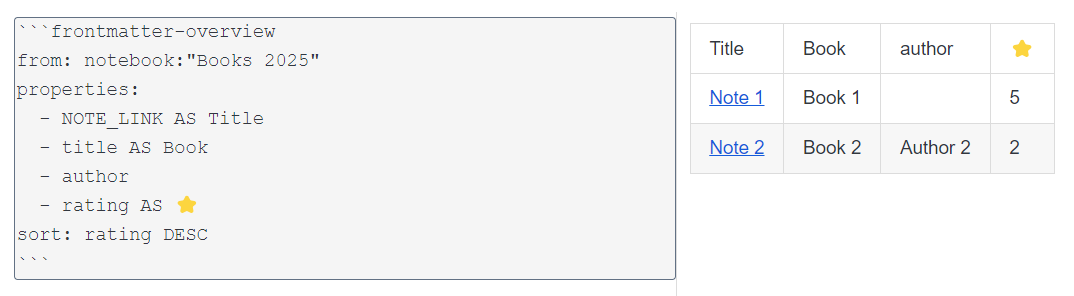
Description
Create dynamic tables based on frontmatter in your notes.
Additional Information
| Links: | |
|---|---|
| Maintainers: | meisenburger13 |
| Version: | 1.4.0 |
| Minimum app version: | 2.13 |
| Downloads: This version: | 391 |
| Last updated: | 2026-06-07T22:46:50Z |
Joplin Plugin — Frontmatter Overview
Create dynamic tables based on frontmatter in your notes. Works on both desktop and mobile.
Quick Example
Given these two notes in a notebook called Books read:
| Note 1 | Note 2 |
|---|---|
--- |
--- |
Using the following code block in a note:
```frontmatter-overview
from: notebook:"Books read"
properties:
  - LINE_NUM AS Number
  - NOTE_LINK AS Title
  - title AS Book
  - author
  - rating AS ⭐
  - pages
sort: rating DESC
sum: pages
average:
- pages
- rating
```
Will generate this table:
| Number | Title | Book | author | ⭐ | pages |
|---|---|---|---|---|---|
| 1 | Note 1 | Book 1 | 5 | 200 | |
| 2 | Note 2 | Book 2 | Author 2 | 2 | 300 |
| Average: 3.50 | Sum: 500 Average: 250.00 |
❗Does not work in Rich Text (WYSIWYG) editor. ❗
What is Frontmatter?
Frontmatter is a block of YAML metadata at the top of a note, enclosed in triple dashes:
---
title: Example
rating: 5
---
You can also use three underscores instead of dashes as delimiters for the frontmatter if Joplin's syntax highlighting is an issue for you.
This plugin supports Markdown links and images in the frontmatter, although they are not valid YAML.
Images need to be Joplin resources in order to be rendered correctly.
A note with invalid YAML syntax will be shown with empty values in the custom properties.
Tip: Add the
NOTE_LINKcolumn to easily find the problematic notes and fix their frontmatter.
Overview Block Options
Using a code block with the language set to frontmatter-overview will trigger this
plugin to render a table in the viewer.
| Key | Description | Type |
|---|---|---|
from |
Joplin search filter based on this syntax — all matching notes will turn into a row in the table. | string |
properties |
List of frontmatter fields or special properties — each will be a column in the rendered table. Use AS to rename the property in the table header. |
array |
sort |
(Optional) Sort the table by a property (add DESC for descending). Values need to match one of the original property names. |
string or array |
excludeEeempty |
(Optional) Exclude notes without any of the relevant frontmatter properties from the overview. | boolean, default false |
count |
(Optional) Add a count of the non-empty values of a property to the footer of the table. Values need to match one of the original property names. |
string or array |
sum |
(Optional) Add the sum of a property to the footer of the table. Non-numerical values are ignored. Values need to match one of the original property names. |
string or array |
average |
(Optional) Add the average of a property to the footer of the table. Non-numerical values are ignored. Values need to match one of the original property names. |
string or array |
Special Properties
NOTE_LINK: A clickable link to the note using its title.LINE_NUM: The line number.NUM_BACKLINKS: The number of notes that link to the current note.
Features
- Embed multiple tables per note.
- Create permanent tables via
Tools → Frontmatter Overview → Make tables in current note permanent(desktop only). - Notes missing a property will have an empty cell, so there's no need to have perfect frontmatter in all notes.
- Notes with invalid frontmatter are included with empty custom property values (special properties like
NOTE_LINKstill work). - The note containing the code block is excluded from the search.
- Set the maximum width and/or height of images in the settings.
Source Code
Find the source code here: https://github.com/Meisenburger13/joplin-frontmatter-overview
Please create an issue if you find a bug or are missing a feature and I will take look!