
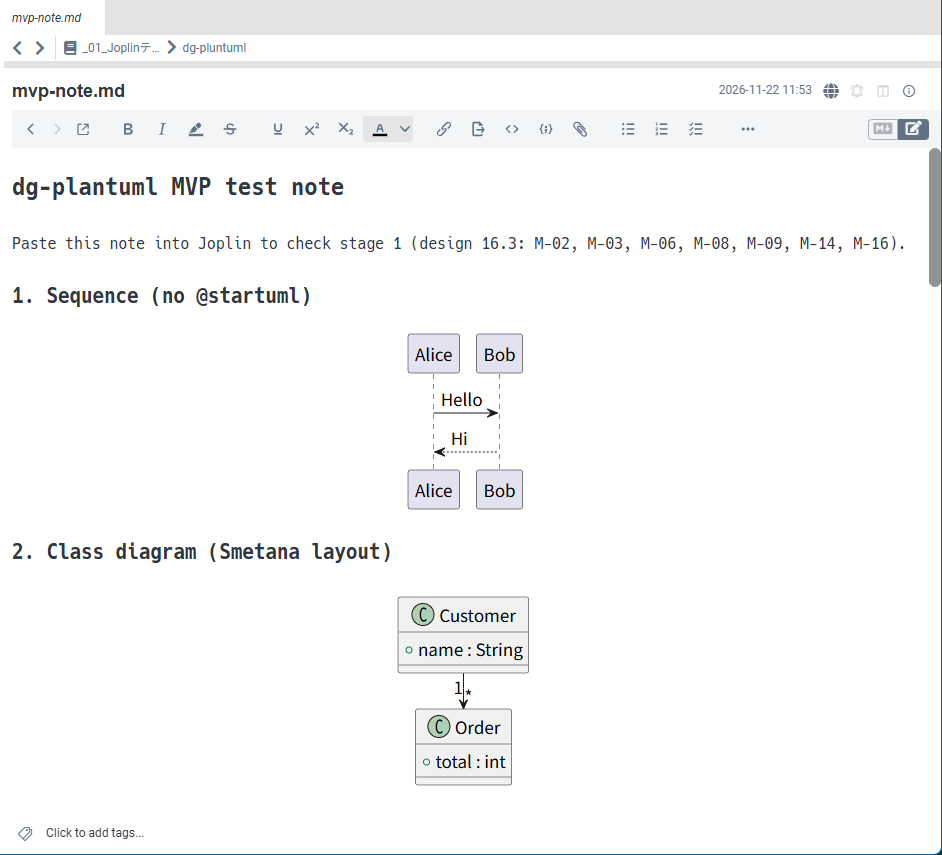
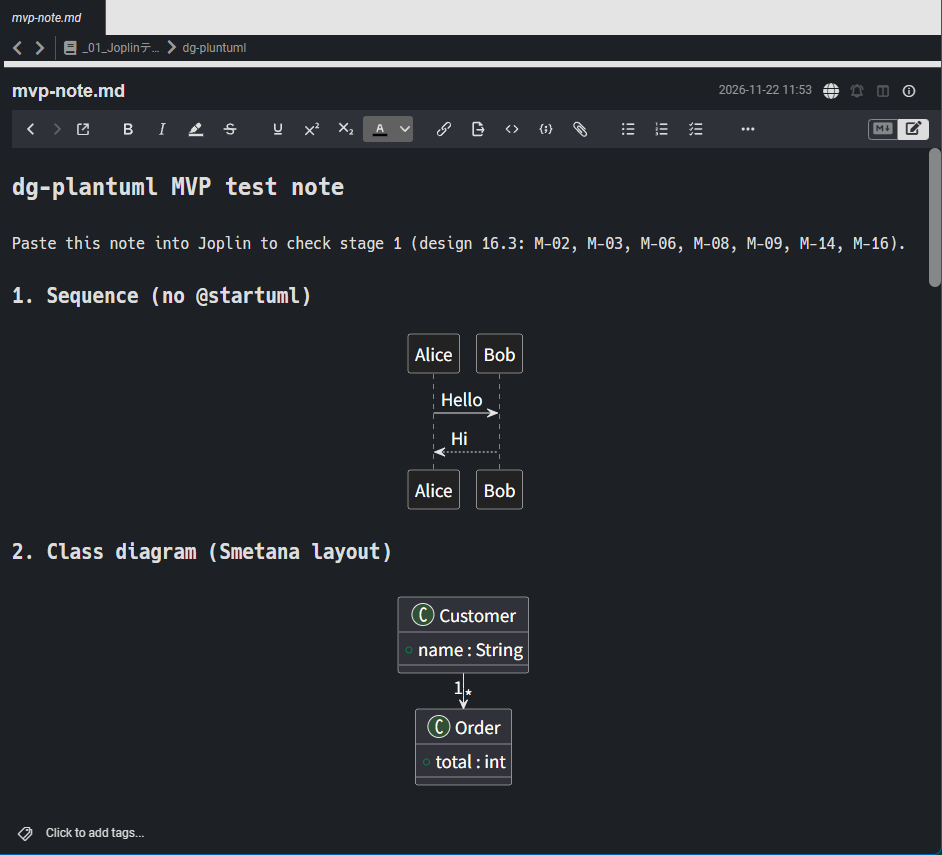
Render PlantUML diagrams with a bundled engine. No external server, no network access.
| Links: | |
|---|---|
| Maintainers: | akiratamcat |
| Version: | 1.0.0 |
| Minimum app version: | 3.1 |
| Downloads: This version: | 4 |
| Last updated: | 2026-11-22T08:02:53Z |
Render PlantUML diagrams in Joplin notes, with the rendering engine bundled inside the plugin.
Bundled engine, no network access. The PlantUML rendering engine is bundled inside this plugin. No external server (such as the public PlantUML server) is used, and the plugin makes no network requests. Your diagrams are rendered locally, and the plugin never sends your notes anywhere. It works fully offline.
This statement covers what the plugin itself does. Joplin's own features, such as synchronisation, are not part of the plugin.
日本語:このページの後半(README.ja.md と同じ内容)
| Light theme | Dark theme |
|---|---|
|
|
plantuml and puml code blocks in the note viewer and in the Rich Text editor, like Joplin's built-in Mermaid support.@plantuml/core), bundled in the plugin. No Java, no Graphviz, no server.Open Joplin's plugin screen (Tools → Options → Plugins on Windows and Linux, Joplin → Settings → Plugins on macOS), search for dg-plantuml, and install it.
You can also download the .jpl file from GitHub Releases and install it with "Install from file" on the plugin screen. To build the plugin yourself, see CONTRIBUTING.md.
Requirements: Joplin 3.1 or later, desktop. Tested with the latest stable version of Joplin.
Write PlantUML in a fenced code block with the language plantuml or puml:
```plantuml
Alice -> Bob : Hello
Bob --> Alice : Hi
```
@startuml / @enduml can be omitted.@startmindmap, @startgantt, @startjson, @startyaml, @startwbs, @startsalt and so on.``` inside a diagram, use a longer fence such as ````.Options can follow the language name:
```plantuml theme=dark align=left
Alice -> Bob
```
| Option | Values | Meaning |
|---|---|---|
theme |
light / dark / none |
Style of this diagram. none adds no styling at all |
align |
left / center / right |
Position of the diagram (default: center) |
Other Markdown tools ignore these options, so the notes stay portable.
!include <...> (C4, AWS icons and other libraries of the PlantUML standard library) is not available. It is shown as an error.!include of local files and !includeurl are not available, because the plugin reads no files and makes no network requests.``` can then break. This is how Joplin handles all code blocks, including Mermaid.Please use the Issues page for bugs, questions and requests. For security problems, see SECURITY.md. To build the plugin or contribute, see CONTRIBUTING.md.
dg-plantuml is released under the MIT License.
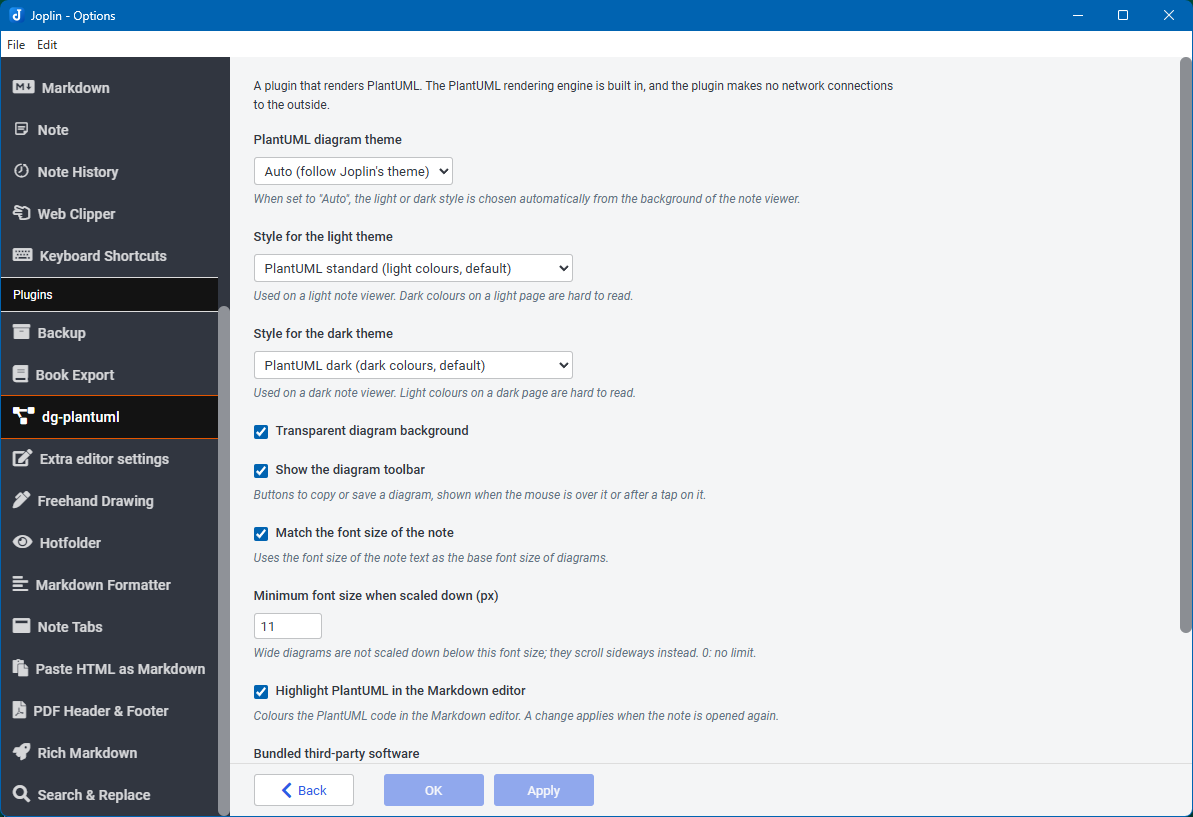
The plugin package also contains the third-party software below. The full license texts are in THIRD_PARTY_NOTICES.md, which is also included in the plugin package. The same list is shown on the plugin's settings screen in Joplin.
| Name | Version | License | Website |
|---|---|---|---|
PlantUML (@plantuml/core), the rendering engine |
1.2026.10 | MIT | https://plantuml.com/ |
| Twemoji graphics (emoji, inside the engine) | as bundled in PlantUML 1.2026.10 | CC-BY 4.0 | https://github.com/twitter/twemoji |
| Open Iconic (icons, inside the engine) | as bundled in PlantUML 1.2026.10 | MIT | https://github.com/iconic/open-iconic |
| DOMPurify (cleans the SVG output) | 3.4.17 | Apache-2.0 (dual-licensed Apache-2.0 / MPL-2.0) | https://github.com/cure53/DOMPurify |
| regenerator-runtime (inside DOMPurify) | as bundled in DOMPurify 3.4.17 | MIT | https://github.com/facebook/regenerator |
Diagrams you make are yours. PlantUML's license says that generated images belong to the author of the diagram source.
This plugin is developed with extensive use of generative AI (Anthropic's Claude). A large share of the design documents, source code, tests, documentation, and translations was produced with Claude. The maintainer reviews each output step by step, decides what to adopt, and makes corrections as needed. The maintainer is responsible for the final content. If you find a problem, please report it on the Issues page.
Joplin のノートで PlantUML の図を表示するプラグインです。描画エンジンをプラグインに内蔵しています。
描画エンジン内蔵・外部通信なし PlantUML の描画エンジンをプラグインに内蔵しています。 PlantUML の公開サーバーなどの外部サーバーは使わず、プラグインはネットワーク通信を一切行いません。 図は手元で描画され、ノートの内容が本プラグインによって外部に送られることはありません。オフラインでも動作します。
これは本プラグイン自身の動作についての説明です。Joplin 本体の同期などの機能は含みません。
| Light のテーマ | Dark のテーマ |
|---|---|
|
|
画面は英語の表示で撮影しています。
plantuml と puml のコードブロックを、ノートビューアとリッチテキストエディタで図として表示します。Joplin 本体の Mermaid と同じ扱いです。@plantuml/core)をプラグインに内蔵しています。Java、Graphviz、サーバーは不要です。Joplin のプラグインの画面(Windows と Linux はツール → オプション → プラグイン、macOS は Joplin → 設定 → プラグイン)で dg-plantuml を検索して、インストールします。
GitHub Releases から .jpl のファイルをダウンロードし、プラグインの画面の「ファイルからインストール」でインストールすることもできます。プラグインを自分でビルドする場合は、CONTRIBUTING.ja.md をご覧ください。
動作環境:Joplin 3.1 以降のデスクトップ版。動作確認は Joplin の最新の安定版で行っています。
言語名を plantuml または puml にしたコードブロックに、PlantUML を書きます。
```plantuml
Alice -> Bob : Hello
Bob --> Alice : Hi
```
@startuml / @enduml は省略できます。@startmindmap、@startgantt、@startjson、@startyaml、@startwbs、@startsalt など)。``` を書きたいときは、```` のような長いフェンスで囲みます。言語名の後ろにオプションを書けます。
```plantuml theme=dark align=left
Alice -> Bob
```
| オプション | 値 | 意味 |
|---|---|---|
theme |
light / dark / none |
この図のスタイル。none はスタイルの指定を一切加えない |
align |
left / center / right |
図の配置(既定は center) |
ほかの Markdown のツールはこれらのオプションを無視するので、ノートの互換性は保たれます。
!include <...>(C4、AWS のアイコンなど、PlantUML の標準ライブラリ)は使えません。エラーとして表示します。!include と !includeurl は使えません。本プラグインはファイルを読まず、ネットワーク通信も行わないためです。``` を含むブロックは、壊れることがあります。Mermaid を含め、Joplin のすべてのコードブロックで同じです。不具合、質問、要望は Issues でお知らせください。セキュリティの問題は SECURITY.ja.md をご覧ください。プラグインのビルドや開発への参加については CONTRIBUTING.ja.md をご覧ください。
dg-plantuml は MIT ライセンス で公開しています。
プラグインのパッケージには、次の外部のソフトウェアも含まれています。ライセンスの全文は THIRD_PARTY_NOTICES.ja.md(英語版は THIRD_PARTY_NOTICES.md)にあり、プラグインのパッケージにも同梱しています。同じ一覧は、Joplin の本プラグインの設定画面にも表示されます。
| 名称 | バージョン | ライセンス | 公式サイト |
|---|---|---|---|
PlantUML(@plantuml/core)。描画エンジン |
1.2026.10 | MIT | https://plantuml.com/ |
| Twemoji の画像(絵文字。エンジンに含まれる) | PlantUML 1.2026.10 に含まれるもの | CC-BY 4.0 | https://github.com/twitter/twemoji |
| Open Iconic(アイコン。エンジンに含まれる) | PlantUML 1.2026.10 に含まれるもの | MIT | https://github.com/iconic/open-iconic |
| DOMPurify(SVG の出力の無害化) | 3.4.17 | Apache-2.0(Apache-2.0 と MPL-2.0 のデュアルライセンス) | https://github.com/cure53/DOMPurify |
| regenerator-runtime(DOMPurify に含まれる) | DOMPurify 3.4.17 に含まれるもの | MIT | https://github.com/facebook/regenerator |
LICENSE は法的な文面のため、英語の原文だけを置いています。
作成した図は作者のものです。PlantUML のライセンスでは、生成された画像は図のソースの作者に属するとされています。
本プラグインは、生成 AI(Anthropic の Claude)を全面的に用いて開発しています。 設計書、ソースコード、テスト、ドキュメント、翻訳のかなりの部分を Claude で作成しました。 作者が Claude の出力を逐次確認し、採用するかどうかの判断と修正を行っており、 最終的な内容の責任は作者が負います。問題を見つけた場合は Issue でお知らせください。