Description
Track your habits with heatmap visualization. Embed ahabitmap code blocks in any note to display your progress.
Additional Information
| Links: | |
|---|---|
| Maintainers: | hixujiang |
| Version: | 1.0.4 |
| Minimum app version: | 2.1 |
| Downloads: This version: | 170 |
| Last updated: | 2026-05-10T12:07:25Z |
Joplin Habit Tracker
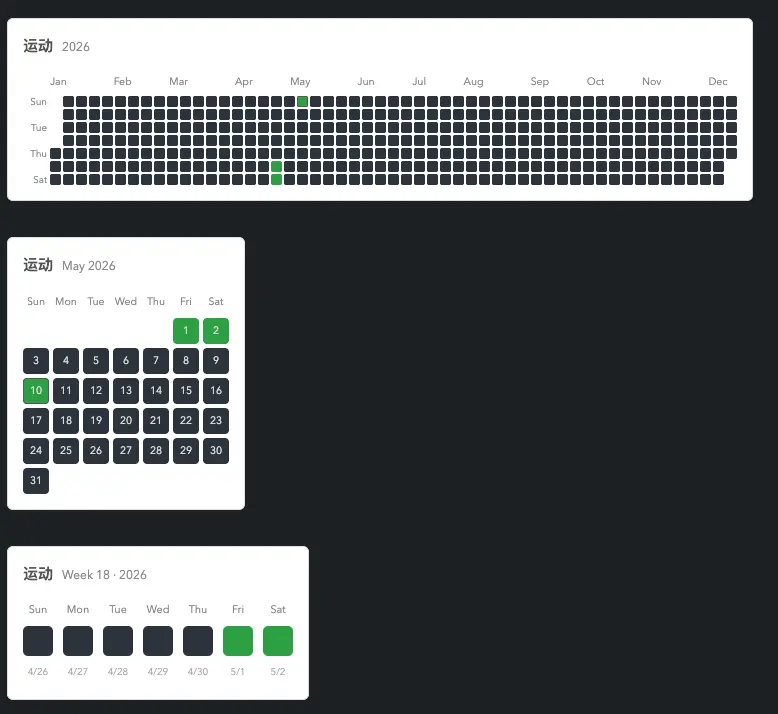
Track your habits in Joplin notes with GitHub-style heatmaps. Embed a habitmap code block in any note to visualize your progress.
Features
- Embed heatmaps directly inside notes using fenced code blocks
- Three view types: full-year heatmap, monthly calendar grid, weekly row
- Click any cell to toggle a check-in; click again to remove it
- Supports multiple habits tracked independently
- Language setting: English / 中文
- Week start setting: Sunday / Monday
- Data stored as JSON in a dedicated Joplin note — syncs across all devices via Joplin Sync
- Light and dark theme support
Installation
Option 1 — Install from .jpl file (recommended)
- Download the latest
.jplfile from the Releases page - In Joplin: Preferences → Plugins → Install from file
- Select the
.jplfile and restart Joplin
Option 2 — Build from source
git clone https://github.com/Mdreame/Joplin-Habit-Tracker.git
cd Joplin-Habit-Tracker
pnpm install   # installs dependencies and builds automatically
The built artifact is in publish/. Install it via Option 1.
Usage
Basic syntax
Insert a fenced code block with the habitmap language identifier:
```habitmap
habit: exercise
year: 2026
```
Switch to preview mode (or split view). The block renders as a heatmap. Click any cell to toggle that date's check-in status.
Configuration fields
| Field | Required | Description | Example |
|---|---|---|---|
habit |
Yes | Habit name — used as the unique data key | habit: exercise |
view |
No | View type: year / month / week. Default: year |
view: month |
year |
No | Year to display. Default: current year | year: 2026 |
month |
No | Month (1–12), used by month view. Default: current month |
month: 5 |
week |
No | ISO week number, used by week view. Default: current week |
week: 19 |
title |
No | Display title. Defaults to the value of habit |
title: Daily run |
Year view (default)
Full-year heatmap with 53 week columns. Day-of-week labels (rows 1, 3, 5, 7) are shown on the left.
```habitmap
habit: exercise
view: year
year: 2026
```
Month view
Traditional calendar grid showing one month. Columns are labeled Sun–Sat (or Mon–Sun depending on the week-start setting).
```habitmap
habit: exercise
view: month
year: 2026
month: 5
```
Week view
A single week displayed as a horizontal row of 7 cells, each labeled with the day name and date.
```habitmap
habit: exercise
view: week
year: 2026
week: 19
```
Multiple habits and views in one note
Any number of habitmap blocks can be placed in the same note:
```habitmap
habit: exercise
title: Daily exercise
```

```habitmap
habit: reading
view: month
title: Daily reading
```

```habitmap
habit: meditation
view: week
```
Browsing history
Change year, month, or week to navigate historical data. All views share the same underlying dataset:
```habitmap
habit: exercise
view: month
year: 2025
month: 12
```
Settings
Open Tools → Options → Habit Tracker to configure:
| Setting | Options | Description |
|---|---|---|
| Week starts on | Sunday / Monday | Controls the first column of year view and first column of month view |
| Language | English / 中文 | Switches month names, day labels, and subtitle format |
Data storage
All check-in data is stored in a note titled __habit-tracker-data__ as JSON:
{
  "exercise": {
    "2026-05-01": 1,
    "2026-05-08": 1
  },
  "reading": {
    "2026-05-03": 1
  }
}
This note is created automatically on the first check-in. Do not delete it manually. You can edit it directly to bulk-correct data.
Development
Requirements: Node.js ≥ 18, pnpm ≥ 9
pnpm install        # install dependencies
pnpm dist           # build the plugin
pnpm updateVersion  # bump version in package.json and manifest.json
To develop without reinstalling the .jpl each time: Tools → Plugins → Developer options → Load development plugin, then select the dist/ directory.
Project structure
Joplin-Habit-Tracker/
├── api/                          # Joplin Plugin API type declarations
│   ├── index.ts                  # Re-exports the typed `joplin` global
│   ├── types.ts                  # Enums: ContentScriptType, SettingItemType, etc.
│   └── Joplin.d.ts               # Interface definitions for all joplin.* APIs used
├── src/
│   ├── manifest.json             # Plugin metadata (id, name, version, categories)
│   ├── index.ts                  # Plugin entry point:
│   │                             #   - registers settings (weekStart, language)
│   │                             #   - registers the MarkdownIt content script
│   │                             #   - handles messages: loadData / checkIn / getSettings
│   └── contentScript/
│       ├── habitmap.ts           # Markdown-it plugin (server-side renderer):
│       │                         #   - intercepts ```habitmap fenced blocks
│       │                         #   - parses config (habit, view, year, month, week, title)
│       │                         #   - outputs the container HTML with data-* attributes
│       ├── habitmap-runtime.js   # Browser-side runtime (loaded as a renderer asset):
│       │                         #   - fetches data and settings via webviewApi.postMessage
│       │                         #   - builds year / month / week grid DOM
│       │                         #   - handles cell click → toggle → re-render
│       │                         #   - watches for new containers via MutationObserver
│       └── habitmap.css          # Styles for all three views + dark mode support
├── plugin.config.json            # Lists habitmap.ts as an extra script to compile
├── webpack.config.js             # Official Joplin plugin build script
├── tsconfig.json                 # TypeScript compiler options
└── package.json                  # Dependencies and build scripts
License
MIT