Description
Track daily habits with weekly, monthly and yearly views; syncs via note-level metadata. Independent, AI-assisted fork of Daily Habits by pulsarnomada9 (MIT) - see README for credit and details.
Additional Information
| Links: | |
|---|---|
| Maintainers: | pb-strawberries |
| Version: | 1.2.2 |
| Minimum app version: | 3.0.0 |
| Downloads: This version: | 224 |
| Last updated: | 2026-08-11T03:52:52Z |
Habit Tracker Plus — Joplin plugin
Track daily habits directly inside Joplin, on desktop and mobile. Create habits with weekly or monthly goals, tick off each day, and review your progress in weekly, monthly and yearly views — all stored in your notes and synced across your devices.
⚠️ AI-assisted project — use with caution. This plugin was created by copying and modifying another developer's code with the help of an AI coding assistant (Claude). The changes have been built, typechecked, and tested live on both desktop and mobile Joplin by the author before release. Still, review the code yourself before trusting it with your data, and back up anything important. Bug reports and code review are welcome.
This is an independent, standalone project based on pulsarnomadas/Daily-Habit-Tracker by pulsarnomada9 (MIT licensed). All credit for the original design, data model, and implementation goes to that project. This fork exists because of an unresolved sync bug (desktop and mobile each creating their own separate anchor note instead of sharing one) that had gone two months without a maintainer response — see "What's different" below for the specific changes made here. It is not affiliated with, endorsed by, or connected to the original project or author; it does not share a plugin ID, npm package, or data note with it, so both can safely coexist if you have the original installed.
- Author: pb-strawberries
- Repository: https://github.com/pb-strawberries/habit-tracker-plus
- npm: https://www.npmjs.com/package/joplin-plugin-habit-tracker-plus
- Plugin ID:
io.github.pb-strawberries.habit-tracker-plus - License: MIT (see License for full attribution)
What's different from the original
- Fixed a duplicate-anchor-note bug: the original creates a brand-new "Daily Habits" note on every device that hasn't already got a locally-remembered note id — so a second device installing the plugin before it's synced down the first device's note ends up with its own disconnected copy forever. This fork searches for an already-existing anchor note (exact title + notebook match) before creating a new one.
- Added a "Week starts on" setting (Options → Plugins → Habit Tracker Plus): choose Automatic (locale-based, the original's only behavior), Sunday, Monday, or Saturday.
Features
- Create & remove habits, each with a frequency goal: N times per week or per month (default: 1× per week).
- Four views, each always showing the current period:
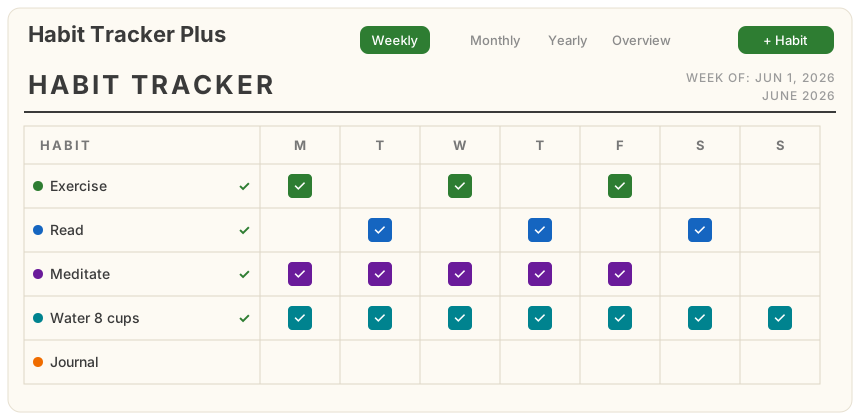
- Weekly — a printable-style "HABIT TRACKER" table: a
HABITcolumn plus the seven weekday columns for the current week. Day headers are responsive — full names (Monday), short names (Mon), or single letters (M) depending on panel width. - Monthly — the same tracker styling, one row per habit, with the month's day cells that flow and wrap to fit the available width.
- Yearly — twelve month calendars for the current year (4 per row, 2 on narrow screens). Each day shows a colored dot per habit completed that day, with a color-code legend below.
- Overview — today's completion plus per-habit current streak, best streak, goal progress and total checks.
- Weekly — a printable-style "HABIT TRACKER" table: a
- Goal checkmark — a ✓ appears to the right of a habit's name whenever its goal for the current period has been reached.
- Desktop + mobile — one webview panel that adapts its layout to the screen.
How your data is stored
All data lives in note-level metadata (Joplin's userData API) attached to a single
dedicated “Habit Tracker Plus” note that the plugin creates automatically (inside a notebook
of the same name). userData is JSON key/value data that syncs across devices with
per-key, timestamp-based merging.
| Key | Contents |
|---|---|
habits |
The list of habits and their goals (id, name, color, order, createdAt, target). |
checks.<habitId> |
A map of YYYY-MM-DD → true (one key per habit, so edits to different habits never conflict on sync). Only checked days are stored. |
The dedicated note's id is remembered in a private plugin setting. If you delete the note, a fresh one is created automatically on next launch. You can freely rename or move the note — only deleting it resets the tracker.
Installation
From the Joplin plugin repository (recommended)
- In Joplin: Tools → Options → Plugins (desktop) or Configuration → Plugins (mobile).
- Search for Habit Tracker Plus and install.
From a built .jpl file
- Build it (see below) or download
publish/io.github.pb-strawberries.habit-tracker-plus.jpl. - Desktop: Plugins → gear icon → Install from file → select the
.jpl. Mobile (Joplin 3.1+): Configuration → Plugins → enable Show advanced settings → install from file.
Using it
- The tracker panel opens automatically on startup. You can also toggle it from the editor toolbar button or the command palette entry “Habit Tracker Plus: open tracker” (desktop also has Tools → Habit Tracker Plus: open tracker).
- On mobile, the panel appears in a tabbed dialog opened from a toolbar button.
Requirements
- Joplin 3.0.0+ on desktop, 3.1.0+ on mobile (declared via
app_min_version/app_min_version_mobile). The plugin uses theuserDataand trash (deleted_time) APIs, which require these versions.
Building from source
npm install        # installs deps and builds via the "prepare" script
npm run dist       # rebuild on demand -> publish/io.github.pb-strawberries.habit-tracker-plus.jpl
The build pipeline is the standard generator-joplin webpack setup:
buildMain (compiles src/index.ts and copies the webview assets) →
buildExtraScripts → createArchive (packages dist/ into the .jpl).
Project layout
| Path | Purpose |
|---|---|
src/index.ts |
Plugin entry: settings, anchor-note bootstrap, panel/command/toolbar, message handler, mobile fallback. |
src/dataStore.ts |
userData read/write + anchor-note management. |
src/types.ts |
Shared types (Habit, HabitState, …). |
src/panel/panel.js |
Webview UI: the four views, aggregates, add/edit/remove, check toggling. |
src/panel/panel.css |
Webview styles (uses Joplin theme variables; responsive). |
api/ |
Vendored Joplin plugin API type definitions (from generator-joplin). |
Architecture
The plugin process (index.ts) owns all storage — the webview has no access to Node or
the Joplin data API. The webview (panel.js) renders state and sends messages
(getData, addHabit, updateHabit, removeHabit, toggleCheck) via
webviewApi.postMessage; the plugin persists each change to userData and returns fresh
state, which the webview re-renders. This keeps storage the single source of truth.
Publishing to the Joplin plugin repository
Joplin's plugin repository is populated automatically from npm:
npm publish        # package name starts with "joplin-plugin-" and includes the
                   # "joplin-plugin" keyword, so the Joplin bot picks it up
After publishing, the Joplin bot periodically scans npm and opens a pull request to
joplin/plugins to add/update the plugin; once
merged it becomes searchable in-app.
Contributing
Issues and pull requests are welcome at
https://github.com/pb-strawberries/habit-tracker-plus. Run npm run dist and load the
plugin as a development plugin (Options → Plugins → Advanced → development plugins path)
to test changes locally.
License
MIT. This project is based on
pulsarnomadas/Daily-Habit-Tracker,
© pulsarnomada9, also MIT licensed — the original copyright notice is preserved in
LICENSE as the license requires. Modifications in this fork are © pb-strawberries.