A hover-expanding minimap outline for the Markdown editor and viewer: a compact stack of level-encoded bars that tracks the current section and expands into a full clickable table of contents on hover. Theme-aware, live settings, multi-window.
| Links: | |
|---|---|
| Maintainers: | pmslava |
| Version: | 0.4.0 |
| Minimum app version: | 3.3 |
| Downloads: This version: | 121 |
| Last updated: | 2026-09-24T18:41:07Z |
A hover-expanding minimap outline for the Markdown editor and the rendered viewer.
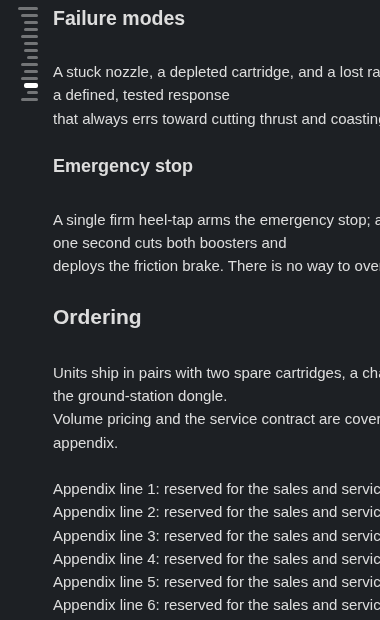
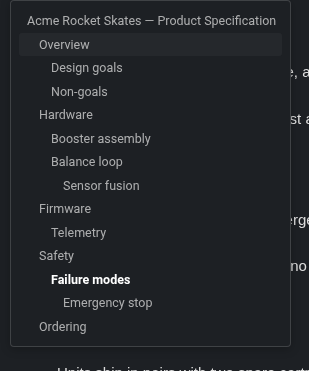
Ridgeline draws a compact stack of thin bars down the edge of your note — one bar per heading, its length encoding the heading level — so the shape of a long note is always in view without taking any real space. The bar for the section you are reading is brightened and thickened, and it tracks your scrolling live. Rest the pointer on the bars and the stack expands into a full table of contents, indented by level, with the current heading highlighted; click any bar or row to jump straight to it. It works the same in the raw editor and in the rendered viewer, follows your Joplin theme, and updates instantly when you change its settings — no reload.
The compact minimap in the editor: one thin bar per heading, length encoding the level, with the current section's bar brightened.
Resting the pointer on the bars opens the full outline — rows indented by heading level, the current heading in bold.
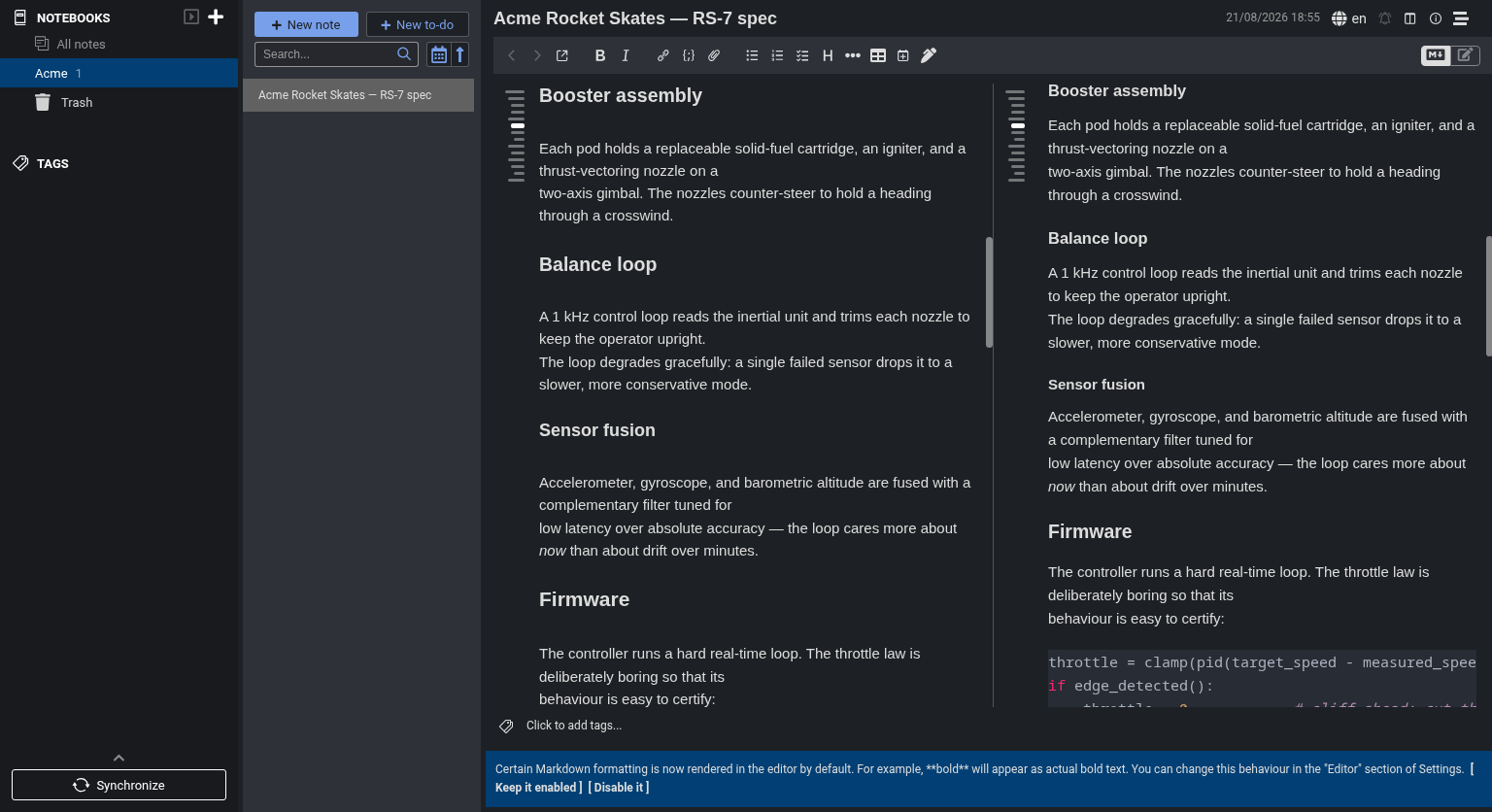
In a split view the minimap tracks the current section in both the editor and the rendered viewer at once.
Ctrl+Alt+P pins and unpins from anywhere, and a setting does the same.[the guide][guide], whose [guide]: definition may sit anywhere in the note — and inline code, emphasis, escapes and the common HTML entities are rendered rather than printed.In Joplin, open Settings → Plugins, search for "Ridgeline", and click Install. Ridgeline is desktop-only (it needs the CodeMirror editor) and requires Joplin 3.3 or newer.
To install the file by hand instead, download io.github.pmslava.ridgeline.jpl from the releases page and use Plugins → Install from file.
All settings live under Settings → Ridgeline. Every one applies live, with the single exception of Show the toolbar toggle button, which takes effect only after restarting Joplin (see the note in the table).
| Setting | Default | What it does |
|---|---|---|
| Minimap side | Left | Which edge of the editor/viewer the minimap sits on — Left or Right. |
| Editor minimap margin | None | The thin margin for the minimap's bars in the Markdown editor: None lets the bars overlay the text, Thin margin keeps the text clear of them. It applies to the bars only, never to the outline — a pinned outline has its own, wider margin below. |
| Viewer minimap margin | None | The same choice for the rendered viewer, set independently of the editor. |
| Maximum heading depth | H1–H6 | The deepest heading level shown. Headings deeper than this are dropped from the minimap and the outline. |
| Show minimap | On | Master switch for the minimap in both panes. Toggle without disabling the plugin (see the command below). |
| Hide minimap when the note has no headings | On | On a heading-less note, hide the minimap and drop its reserved margin so the text uses the full width. (A pinned outline stays: it shows No headings so you can unpin it in place.) |
| Show the toolbar toggle button | On | Show the fa-stream note-toolbar button that toggles the minimap. Takes effect only after restarting Joplin — the plugin API cannot remove a toolbar button once created. The Tools → Ridgeline menu entry and Ctrl+Alt+M keep working regardless. |
| Hover open delay (ms) | 300 | How long the pointer must rest on the bars before the outline opens (100–1000 ms). Higher = a quick trip across the minimap never opens it. |
| Show the outline toolbar | Off | Adds a row of controls to the top of the outline (the table of contents that opens over the minimap): Width, Headings and Pin. They change the three settings below, which also work from here without the toolbar. |
| Outline maximum width (% of the pane) | 33 | The widest the outline may grow, as a share of the pane. Whether it opened on hover or is pinned, the outline stays as narrow as its headings allow and never narrower than its toolbar or 140 px. The toolbar's Width control offers 25, 33 and 50 and a field for any value from 10 to 90; this is the same setting. |
| Pin the outline open | Off | Keep the outline open at the full height of the pane instead of opening it on hover — in the editor and the viewer, in every window — until it is unpinned here, with the toolbar's Pin button, or with Ctrl+Alt+P. A pin survives a restart. |
| Make room for the pinned outline | On | While the outline is pinned, push the note text aside by the outline's width so the outline never covers a word (it keeps its border, so where the note ends stays visible). This is the outline's own, wide margin — separate from the thin minimap margins above. Off: the pinned outline overlays the text, as it does on hover. On a pane too narrow to leave 200 px of text beside it, no room is made. |
| Command | Shortcut | Also |
|---|---|---|
| Ridgeline: Toggle minimap | Ctrl+Alt+M |
A note-toolbar button (the fa-stream icon — a stack of staggered lines that reads as the minimap). |
| Ridgeline: Toggle minimap side (left/right) | Ctrl+Alt+R |
— |
| Ridgeline: Toggle hide-when-empty | Ctrl+Alt+H |
— |
| Ridgeline: Toggle outline pin | Ctrl+Alt+P |
Also the Pin button in the outline toolbar, and the Pin the outline open setting — all three flip the same thing, with or without the toolbar. |
| Ridgeline: Toggle room for the pinned outline | Ctrl+Alt+O |
Flips Make room for the pinned outline: the pinned outline either pushes the note text aside or overlays it. Takes effect while something is pinned. |
All five also sit together in the Tools → Ridgeline submenu, listed there under the same full
names as above (Joplin labels a plugin menu entry from its command, so the Ridgeline: prefix is
repeated inside the submenu). Each flips the matching setting, so both panes update live.
git clone https://github.com/pmslava/joplin-plugin-ridgeline
cd joplin-plugin-ridgeline
npm install
npm run dist
npm run dist builds the publishable plugin to publish/io.github.pmslava.ridgeline.jpl.
For the end-to-end test suite, regenerating the showcase screenshots, and a tour of the repository layout, see DEVELOPMENT.md. See PUBLISHING.md for the release flow.
If this plugin is useful to you, support the work: GitHub Sponsors for monthly or one-time sponsorship, or Ko-fi for a one-off tip by PayPal or card without an account. All options: pmslava.com/support.
Ridgeline's click-to-jump machinery — firing scrollToHash for the rendered viewer and an editor scroll command for the raw Markdown pane so a jump from either surface keeps both in step — follows the approach in cqroot/joplin-outline (MIT).
MIT. See LICENSE.