Description
Track daily habits with weekly, monthly and yearly views. Habits and their daily checks are stored in note-level metadata so they sync across desktop and mobile.
Additional Information
| Links: | |
|---|---|
| Maintainers: | pulsarnomada9 |
| Version: | 1.0.0 |
| Minimum app version: | 3.0.0 |
| Downloads: This version: | 595 |
| Last updated: | 2026-06-03T22:20:04Z |
Daily Habits — Joplin plugin
Track daily habits directly inside Joplin, on desktop and mobile. Create habits with weekly or monthly goals, tick off each day, and review your progress in weekly, monthly and yearly views — all stored in your notes and synced across your devices.
- Author: pulsarnomada9
- Repository: https://github.com/pulsarnomadas/Daily-Habit-Tracker
- npm: https://www.npmjs.com/package/joplin-plugin-daily-habits
- Plugin ID:
io.github.pulsarlens.daily-habits - License: MIT
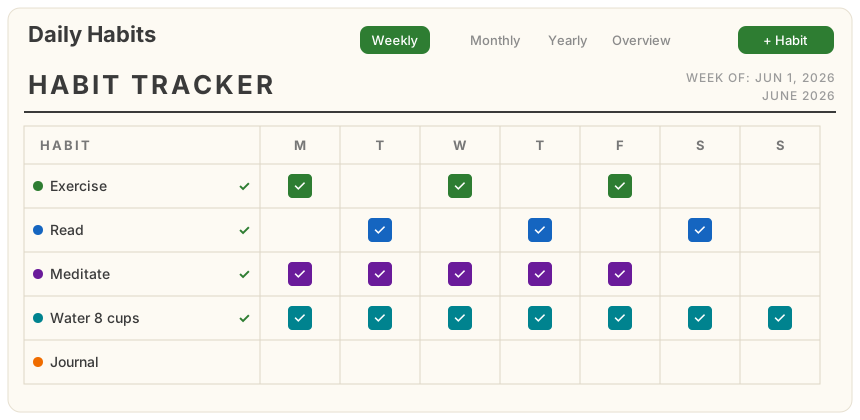
The image above is an illustrative mockup of the Weekly view. Replace
docs/preview-weekly.svgwith a real screenshot from your Joplin once installed.
Features
- Create & remove habits, each with a frequency goal: N times per week or per month (default: 1× per week).
- Four views, each always showing the current period:
- Weekly — a printable-style "HABIT TRACKER" table: a
HABITcolumn plus the seven weekday columns for the current week. Day headers are responsive — full names (Monday), short names (Mon), or single letters (M) depending on panel width. - Monthly — the same tracker styling, one row per habit, with the month's day cells that flow and wrap to fit the available width.
- Yearly — twelve month calendars for the current year (4 per row, 2 on narrow screens). Each day shows a colored dot per habit completed that day, with a color-code legend below.
- Overview — today's completion plus per-habit current streak, best streak, goal progress and total checks.
- Weekly — a printable-style "HABIT TRACKER" table: a
- Goal checkmark — a ✓ appears to the right of a habit's name whenever its goal for the current period has been reached.
- Desktop + mobile — one webview panel that adapts its layout to the screen.
How your data is stored
All data lives in note-level metadata (Joplin's userData API) attached to a single
dedicated “Daily Habits” note that the plugin creates automatically (inside a notebook
of the same name). userData is JSON key/value data that syncs across devices with
per-key, timestamp-based merging.
| Key | Contents |
|---|---|
habits |
The list of habits and their goals (id, name, color, order, createdAt, target). |
checks.<habitId> |
A map of YYYY-MM-DD → true (one key per habit, so edits to different habits never conflict on sync). Only checked days are stored. |
The dedicated note's id is remembered in a private plugin setting. If you delete the note, a fresh one is created automatically on next launch. You can freely rename or move the note — only deleting it resets the tracker.
Installation
From the Joplin plugin repository (recommended)
- In Joplin: Tools → Options → Plugins (desktop) or Configuration → Plugins (mobile).
- Search for Daily Habits and install.
From a built .jpl file
- Build it (see below) or download
publish/io.github.pulsarlens.daily-habits.jpl. - Desktop: Plugins → gear icon → Install from file → select the
.jpl. Mobile (Joplin 3.1+): Configuration → Plugins → enable Show advanced settings → install from file.
Using it
- The tracker panel opens automatically on startup. You can also toggle it from the editor toolbar button or the command palette entry “Daily Habits: open tracker” (desktop also has Tools → Daily Habits: open tracker).
- On mobile, the panel appears in a tabbed dialog opened from a toolbar button.
Requirements
- Joplin 3.0.0+ on desktop, 3.1.0+ on mobile (declared via
app_min_version/app_min_version_mobile). The plugin uses theuserDataand trash (deleted_time) APIs, which require these versions.
Building from source
npm install        # installs deps and builds via the "prepare" script
npm run dist       # rebuild on demand -> publish/io.github.pulsarlens.daily-habits.jpl
The build pipeline is the standard generator-joplin webpack setup:
buildMain (compiles src/index.ts and copies the webview assets) →
buildExtraScripts → createArchive (packages dist/ into the .jpl).
Project layout
| Path | Purpose |
|---|---|
src/index.ts |
Plugin entry: settings, anchor-note bootstrap, panel/command/toolbar, message handler, mobile fallback. |
src/dataStore.ts |
userData read/write + anchor-note management. |
src/types.ts |
Shared types (Habit, HabitState, …). |
src/panel/panel.js |
Webview UI: the four views, aggregates, add/edit/remove, check toggling. |
src/panel/panel.css |
Webview styles (uses Joplin theme variables; responsive). |
api/ |
Vendored Joplin plugin API type definitions (from generator-joplin). |
Architecture
The plugin process (index.ts) owns all storage — the webview has no access to Node or
the Joplin data API. The webview (panel.js) renders state and sends messages
(getData, addHabit, updateHabit, removeHabit, toggleCheck) via
webviewApi.postMessage; the plugin persists each change to userData and returns fresh
state, which the webview re-renders. This keeps storage the single source of truth.
Publishing to the Joplin plugin repository
Joplin's plugin repository is populated automatically from npm:
npm publish        # package name starts with "joplin-plugin-" and includes the
                   # "joplin-plugin" keyword, so the Joplin bot picks it up
After publishing, the Joplin bot periodically scans npm and opens a pull request to
joplin/plugins to add/update the plugin; once
merged it becomes searchable in-app.
Contributing
Issues and pull requests are welcome at
https://github.com/pulsarnomadas/Daily-Habit-Tracker. Run npm run dist and load the
plugin as a development plugin (Options → Plugins → Advanced → development plugins path)
to test changes locally.
License
MIT © pulsarnomada9