Description
Hue Markdown in the note viewer: colored spans {ok: text}, diff spans, key caps [[Ctrl+C]], progress bars, multi-state tasks and drawn +-- callout boxes, side by side too.
Additional Information
| Links: | |
|---|---|
| Maintainers: | spingras |
| Version: | 0.2.5 |
| Minimum app version: | 3.0 |
| Downloads: This version: | 4 |
| Last updated: | 2026-11-22T16:05:50Z |
Hue MD (.hue.md)





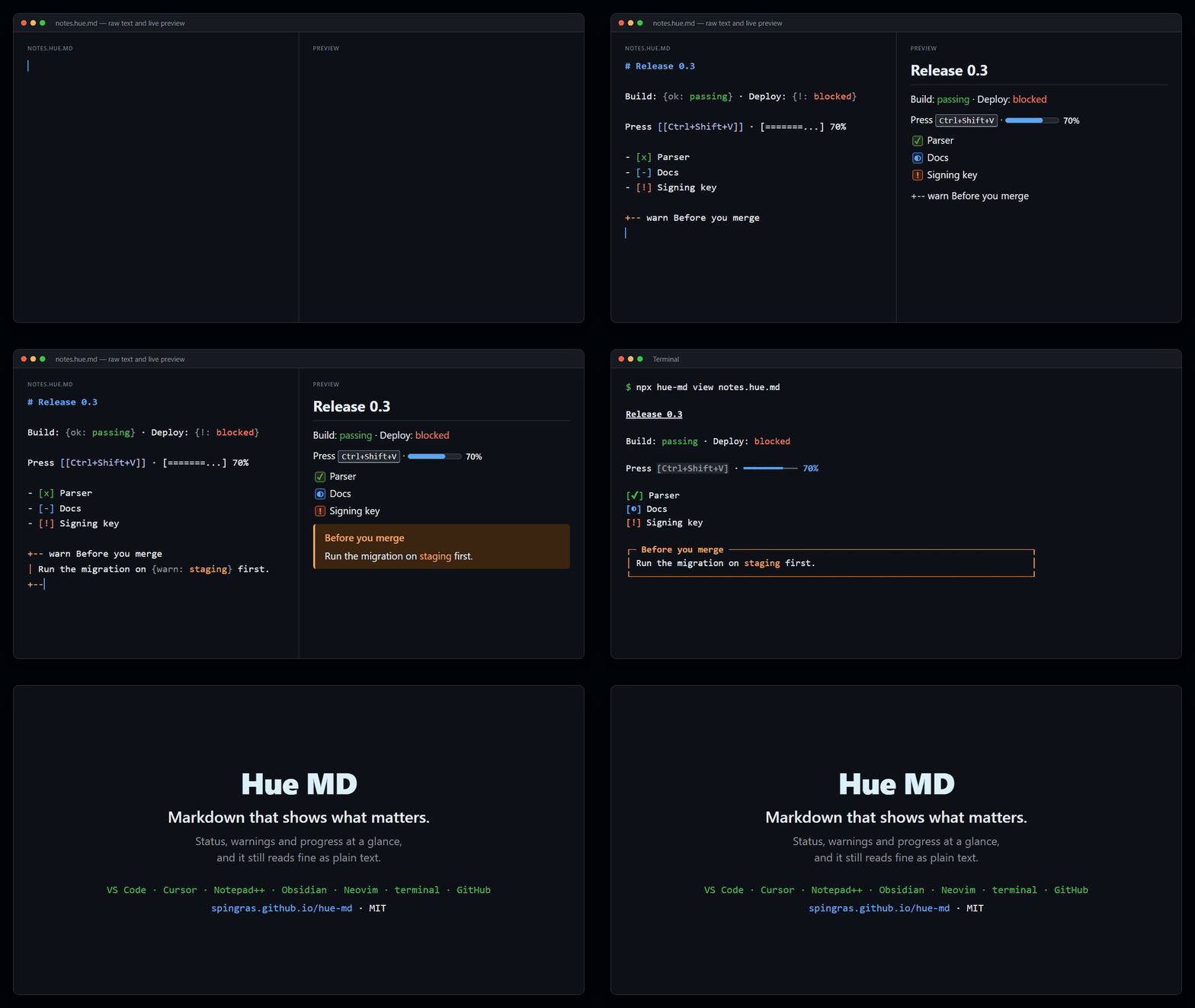
Hue MD adds color spans, diff spans, key caps, progress bars, multi-state tasks, and boxes to Markdown text. You can test the syntax in the interactive playground or read the Hue source of this file in README.hue.md.
{ok: passing} · {+: added} · {-: removed} · [[Ctrl+Shift+P]] · [========..] 80%

- [x] Ship core parser
- [-] Run terminal slide deck
- [!] Resolve blocker

+-- ok Do This                      +-- warn Avoid This
| Keep raw source readable.         | Pollute notes with raw HTML.
+--                                 +--
The raw text stays readable in plain editors, terminal diffs, and AI prompts.

How to install
| Platform | Download | Steps |
|---|---|---|
| VS Code, Cursor, Windsurf | VS Code Marketplace · .vsix |
1. Search for spingras.hue-md in Extensions.2. Select Install. |
| npm CLI and library | npm i -g hue-md |
Run npm install -g hue-md. |
| Claude Code | packages/claude-code-hue/ |
In Claude Code, run /plugin install hue-md --marketplace spingras/hue-md.On versions before 2.1.275: /plugin marketplace add spingras/hue-md, then /plugin install hue-md@spingras. |
| Notepad++ (Windows x64) | hue-md-npp-x64.zip |
1. Download and extract the zip archive. 2. Right-click install.ps1 and choose Run with PowerShell.3. Restart Notepad++. |
| Web stylesheet | hue-md.css |
Add <link rel="stylesheet" href="hue-md.css"> to your HTML <head>. |
| Obsidian | hue-md-obsidian.zip |
1. Extract the zip archive to your vault .obsidian/plugins/hue-md/ folder.2. Enable Hue MD in Community plugins settings. Hue renders in Reading view. |
| Joplin | io.github.spingras.hue-md.jpl |
1. In Joplin, open Tools → Options → Plugins. 2. Click the gear icon, choose Install from file and pick the .jpl.3. Restart Joplin. |
Neovim (hue-md.nvim) |
hue-md-nvim.zip |
1. Extract the zip archive to ~/.config/nvim/pack/hue-md/start/hue-md.nvim.2. Restart Neovim. It loads by itself; :HueBox inserts a box. |
| GitHub.com (userscript) | hue-md.user.js |
1. Install Tampermonkey or Violentmonkey. 2. Open hue-md.user.js in your browser.3. Select Install in your userscript extension. |
| Chromium extension | hue-md-browser.zip |
1. Extract the zip archive. 2. Open chrome://extensions in your browser.3. Turn on Developer mode. 4. Select Load unpacked and choose the extracted folder. |
| Snippets and Emacs | hue-md-snippets.zip |
1. Sublime Text: copy sublime/ into Packages/User/.2. Vim and Neovim: use ultisnips/hue.snippets (UltiSnips) or luasnip/hue.lua (LuaSnip).3. Obsidian: copy obsidian/ into your templates folder.4. Emacs: load emacs/hue-markdown-mode.el in your init file (partial v0.2 support). |
Every platform above supports the full v0.2 syntax, except Emacs (partial).
Syntax
Boxes
Choose one of five box types: info, ok, note, warn, or !.

Write boxes in .hue.md source files:
+-- info Open Boxes
| Start with `+--` followed by `info`, `ok`, `note`, `warn`, or `!`
| Every `|` line starts on a new line
| Close with `+--` without a right border
+--

+-- ok Full Markdown Inside
| Boxes support **bold**, *italics*, `inline code`, and {ok: colored spans}.
| Everything works across Web, CLI, VS Code, Claude Code, and Notepad++.
+--

+-- note GitHub Ready
| Run `hue-md downgrade` to convert Hue boxes into native GitHub Alerts
| (`[!NOTE]`, `[!TIP]`, `[!IMPORTANT]`, `[!WARNING]`, `[!CAUTION]`).
+--

+-- warn Heads Up
| Public API endpoints are rate-limited to {warn: 100 requests/min}.
| Cache responses locally before deploying to production.
+--

+-- ! Never Commit Secrets
| Keep `.env` files out of git.
| - Add `.env` to `.gitignore`
| - Rotate any key that leaked {!: immediately}
+--
The hue-md downgrade command converts these boxes into GitHub alerts:
[!NOTE] Open Boxes
Start with
+--followed byinfo,ok,note,warn, or!
Every|line starts on a new line
Close with+--without a right border
[!TIP] Full Markdown Inside
Boxes support bold, italics,
inline code, and colored spans.
Everything works across Web, CLI, VS Code, Claude Code, and Notepad++.
[!IMPORTANT] GitHub Ready
Run
hue-md downgradeto convert Hue boxes into native GitHub Alerts
([!NOTE],[!TIP],[!IMPORTANT],[!WARNING],[!CAUTION]).
[!WARNING] Heads Up
Public API endpoints are rate-limited to 100 requests/min.
Cache responses locally before deploying to production.
[!CAUTION] Never Commit Secrets
Keep
.envfiles out of git.
- Add
.envto.gitignore- Rotate any key that leaked immediately
You can also use closed borders with ASCII +-- --+, Unicode ┌─ ─┐, or rounded ╭─ ─╮ characters.
Side-by-side split boxes
Place two or more boxes on the same lines separated by at least two spaces. The parser renders them as equal-width columns with a 16 px gap:
+-- ok Do This (Recommended)        +-- warn Avoid This
| Keep raw source human-readable.   | Pollute notes with raw `<span>` HTML.
| Use semantic colors (`ok`, `!`).  | Trap docs inside a JSX build step.
| Run `npm test` before promoting.  | Push untested syntax to production.
+--                                 +--
When you run hue-md downgrade, side-by-side boxes convert into sequential GitHub alerts.
Color spans and diff spans
Wrap inline text in {style: text} for colors or {+: text} and {-: text} for inline diffs.
| Type | Examples |
|---|---|
| Semantic status | {ok: passing}, {info: beta}, {note: v0.2}, {warn: 71%}, {!: blocked} |
| Inline diff | {+: added text}, {-: removed text} |
| Palette color | {red: ...}, {orange: ...}, {yellow: ...}, {green: ...}, {blue: ...}, {purple: ...}, {gray: ...} |
| Background color | {bg-yellow: review this}, {blue bg-gray: badge} |
| Hex color | {#c0ffee bg-#333333: custom hex} |
Multi-state tasks
Use five task markers at the start of list items to track status:
| Marker | State | Color | Downgrade output |
|---|---|---|---|
- [ ] |
Todo | Gray | - [ ] |
- [-] |
In progress | Blue | - [ ] *(in progress)* |
- [!] |
Blocked | Red | - [ ] **[!]** |
- [?] |
Question | Purple | - [ ] **[?]** |
- [x] or - [X] |
Done | Green | - [x] |
Key caps and progress bars
Wrap keyboard shortcuts in double brackets to render <kbd> elements:
Press [[Ctrl+Shift+H]] in Notepad++ or [[Cmd+K]] in VS Code.
WikiLinks with spaces such as [[Project Roadmap]] and array indices such as arr[[0]] remain untouched.
Write progress bars with 4 to 40 bar characters (=, #, ., -, ~, or space) followed by a percentage from 0% to 100%:
| Milestone | Status | Completion |
| :--- | :--- | :--- |
| Core Spec | {ok: shipped} | [==========] 100% |
| CLI Slides | {info: active} | [========..] 80% |
| Rust Port | {warn: wip} | [====......] 40% |
Editor and terminal previews
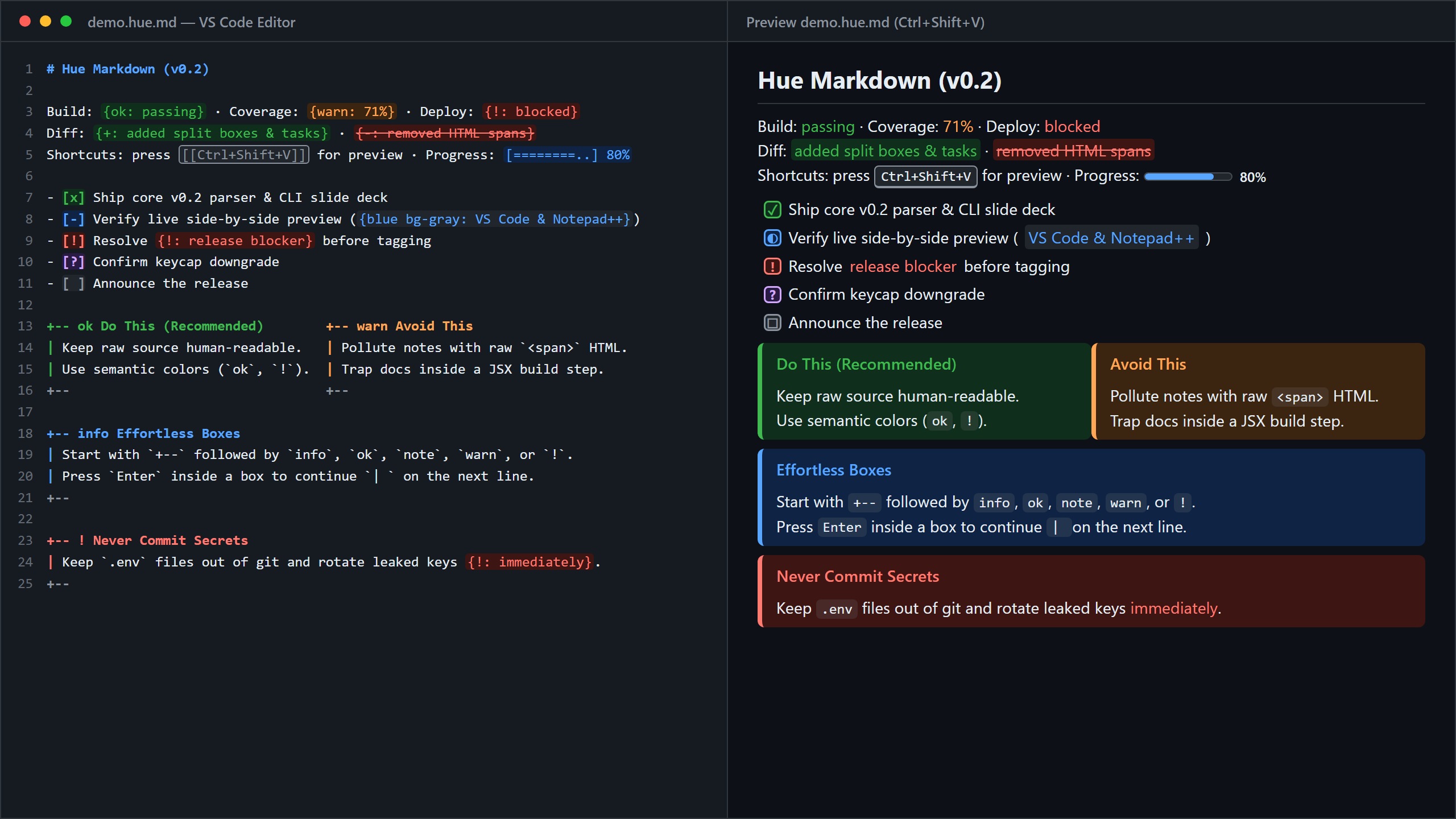
VS Code live preview (Ctrl+Shift+V)
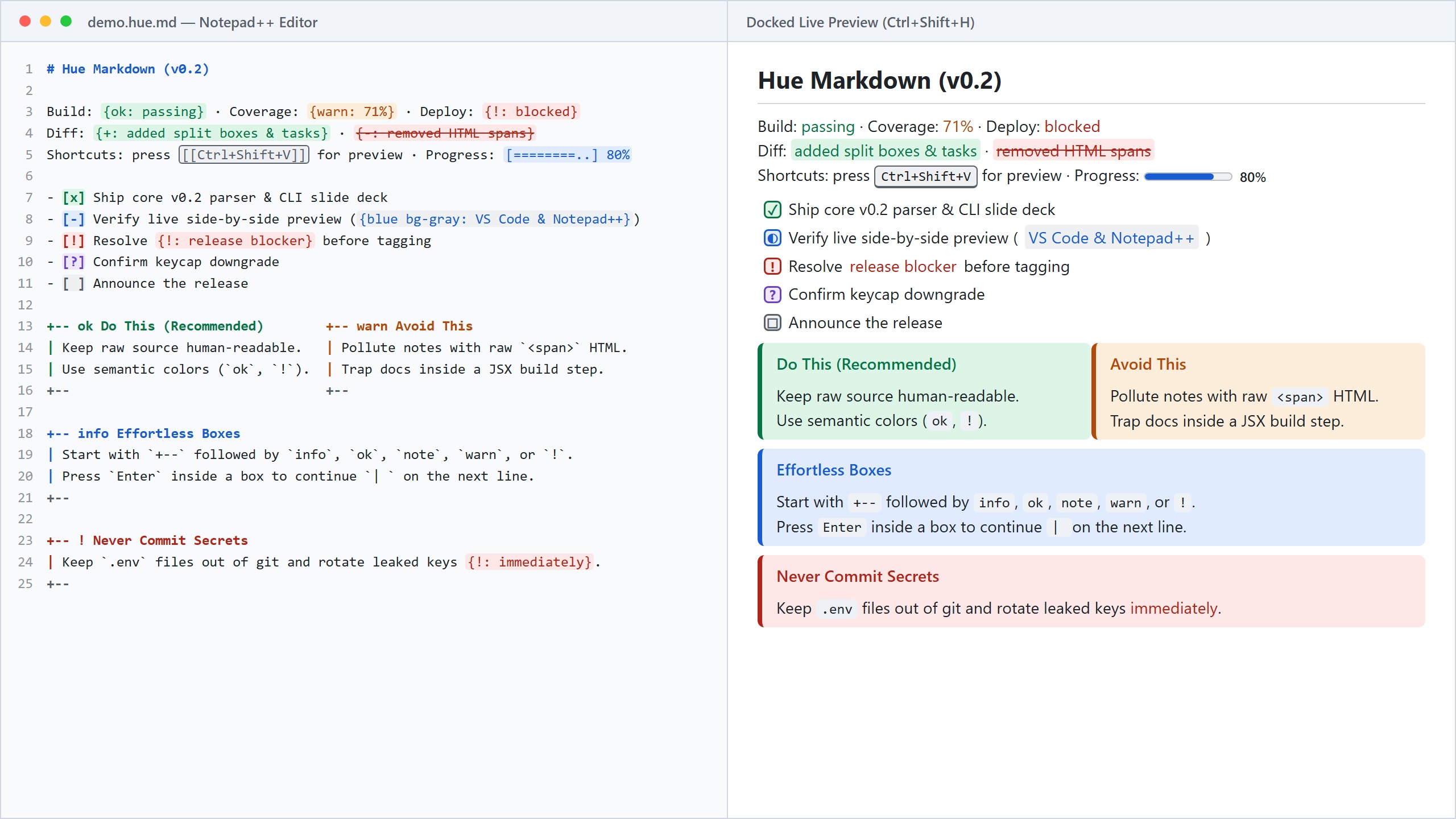
Notepad++ live preview (Ctrl+Shift+H)
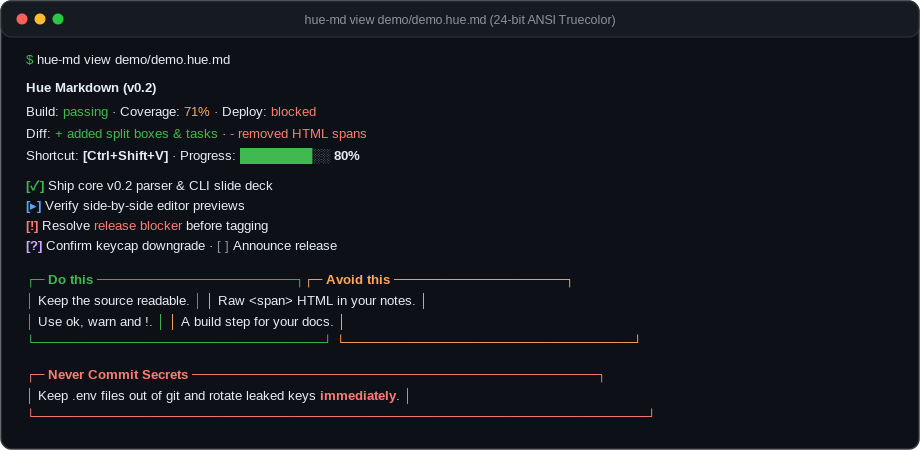
Terminal viewer and slide decks (hue-md view / slides)
Install the CLI from npm or run it with npx hue-md:
npm install -g hue-md
View a document in the terminal with ANSI colors:
hue-md view demo/demo.hue.md
Present a .hue.md file as a terminal slide deck (split on top-level --- lines):
hue-md slides demo/demo.hue.md -i
Downgrade a document to GitHub Flavored Markdown with native alerts:
hue-md downgrade demo/demo.hue.md -o README.md
Export a document to standalone HTML:
hue-md html demo/demo.hue.md --standalone -o index.html
Claude Code plugin
The Claude Code plugin teaches Claude the Hue syntax, so it writes valid .hue.md files when you ask for status reports, checklists, diffs, or callout boxes. It also adds two commands:
/hue-md:preview <file>shows the file with its colors, tasks, key caps, progress bars, and boxes in a pane beside the chat. The pane follows the file as it changes, and opens by itself when Claude writes or edits a.hue.mdfile. Where Claude Code cannot show the pane, the command opens an HTML preview in your browser instead./hue-md:github <file>writes the GitHub Markdown version next to the file (notes.hue.mdtonotes.md).
To have Claude write the GitHub copy after every edit of a .hue.md file, turn on the plugin's auto_downgrade option in /config. The plugin never overwrites a .md file that it did not generate. It includes its own copy of the hue-md CLI, so it needs Node but no npm install.
Reliability
Automated tests verify parser reliability and performance:
- The parser passes all 652 test cases from the CommonMark 0.31.2 specification.
- Tests show 0 unintended changes across 200 npm README files and 50 AI answers.
- All seven palette colors meet WCAG AA contrast ratios of at least 4.5:1 in light and dark modes.
- The parser processes 20,000 unclosed tokens in under 200 ms.
For developers
Install the hue-md package and markdown-it:
npm install hue-md markdown-it
import fs from 'node:fs'
import MarkdownIt from 'markdown-it'
import hue, { css } from 'hue-md'
import { downgrade } from 'hue-md/downgrade'
import { renderAnsi, renderSlides } from 'hue-md/ansi'

// 1. Render Hue Markdown to HTML
const md = new MarkdownIt().use(hue)
const html = md.render('Build: {ok: passing} · Shortcut: [[Ctrl+K]]')
const stylesheet = css() // light + dark CSS custom properties

// 2. Downgrade .hue.md to GitHub Flavored Markdown (with > [!NOTE] alerts)
const sourceText = fs.readFileSync('notes.hue.md', 'utf8')
const gfm = downgrade(sourceText)

// 3. Render 24-bit ANSI truecolor or terminal slides
const ansi = renderAnsi(sourceText, { width: 80, theme: 'dark' })
const slides = renderSlides(sourceText, { width: 80, theme: 'dark' })
The language specification defines the full v0.2 grammar with 88 executable examples. The v0.2 acceptance tests check the parser, terminal renderer and GitHub downgrade.
For remark and unified, packages/remark-hue parses the same syntax, including all v0.2 constructs (in the repository, not yet on npm).
Run the test suite in a clone of this repository:
npm test
License
Hue MD is free software under the MIT License. The code contains no telemetry or data collection.
Support
Hue MD is free. I build it in my own time. If it is useful to you, you can support it:

