Description
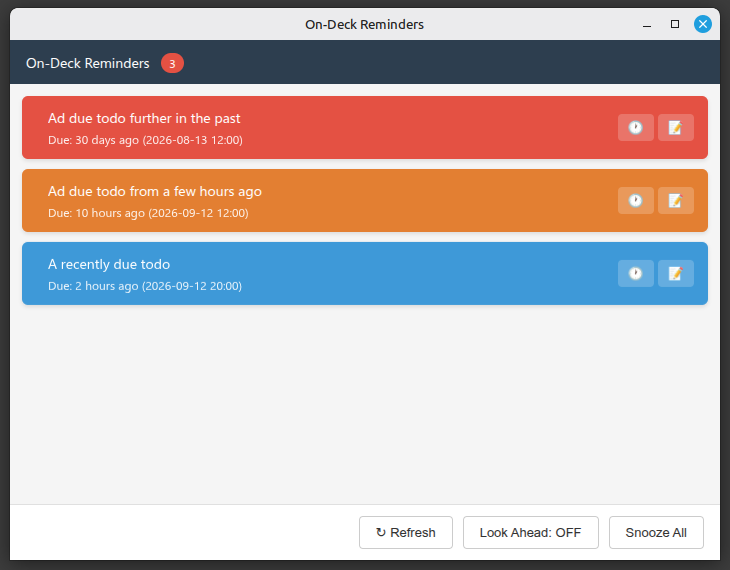
Shows a standalone window with tasks that are due or overdue. Auto-opens when tasks need attention. Supports opening notes and snoozing tasks.
On-Deck Reminders - Joplin Plugin
Shows a standalone window (desktop) or panel (mobile) with tasks that are due or overdue. Auto-opens when tasks need attention. Supports opening notes and snoozing tasks.
Screenshots
Settings:
Installation
From the Joplin plugin store: Search for "On Deck" in Tools → Options → Plugins and click Install.
Usage
- Desktop: The window opens automatically when tasks are due or overdue and closes again when everything is clear. Click a task to open its note.
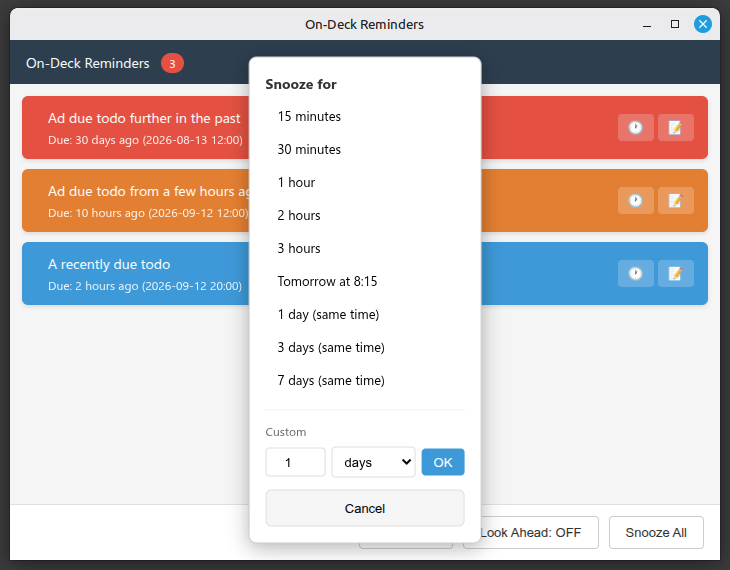
- Snooze: Push a task's due date into the future - presets or a custom number of days.
- Mobile: Toggle the panel with the Toggle On-Deck Panel command.
- Optional Privacy: When the window is opened by a notification, its content stays hidden until you press Show tasks (desktop).
Settings
In Joplin settings under On-Deck:
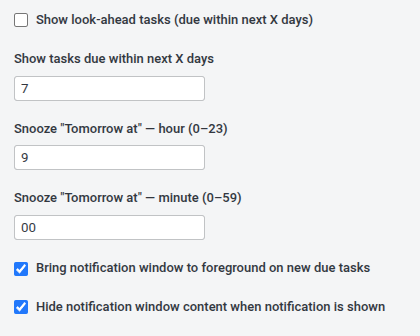
- Show look-ahead tasks - also show tasks due within the next X days (default 7).
- Snooze "Tomorrow at" - the time used by the tomorrow snooze option (default 09:00).
- Bring notification window to foreground (desktop) — focus the window when new due tasks appear.
- Hide notification window content (desktop) — keep task content hidden while a notification is shown (default off).