Aller au contenu principal

· 2 minutes de lecture

Exactly one year ago, on 24 April 2018, the Joplin forum was created as a result of this post on GitHub. Before this, the only way to discuss the project was indeed on the GitHub bug tracker, which is not ideal for general discussion about features, development and so on.

After looking at various options, eventually we settled on Discourse, which provides a nice clean UI, works well on mobile, and is easy to manage. Even better, the Discourse team was kind enough to host the project for us for free, as part of their Free hosting program for open source projects. Not having to manage or pay for the server is great, and it means more time can be spent developing the application.

On the opening day, there was only three users - me, foxmask and zblesk, joined a few days later by tessus, merlinuwe, jhf2442, sciurius and many others. Today there are 811 users, 6700 posts, about 15 new posts created each day, and about 2000 pageviews each day.

The forum has been very useful to discuss features and development, to provide support and news, and to organise events such as Hacktoberfest. It also serves as a knowledge base (via the search function) to provide solutions regarding various Joplin issues.

Of course the forum has also been great to develop the community around the Joplin project, and hopefully will keep serving us well for the years to come!

· Une minute de lecture

The latest release includes two relatively important new features:

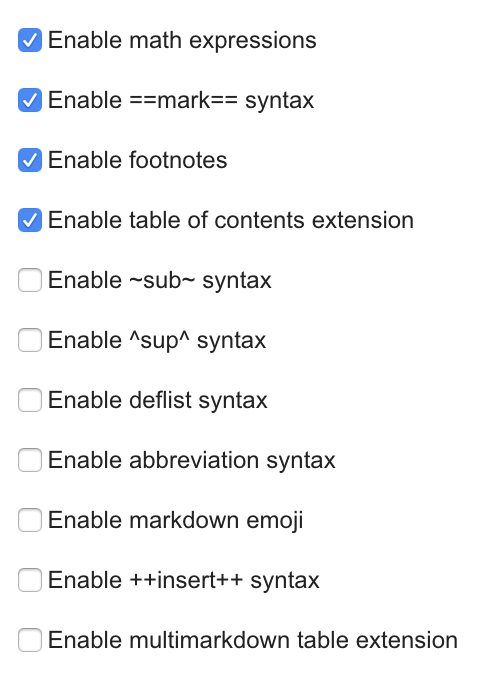
The first one, is the addition of several Markdown plugins that enable new features: for example it's now possible to add a table of contents to your notes, to enable footnotes, or to render various text decorations, such as superscript, subscript, highlighting, etc. This was all made possible thanks to the efforts of Caleb John.

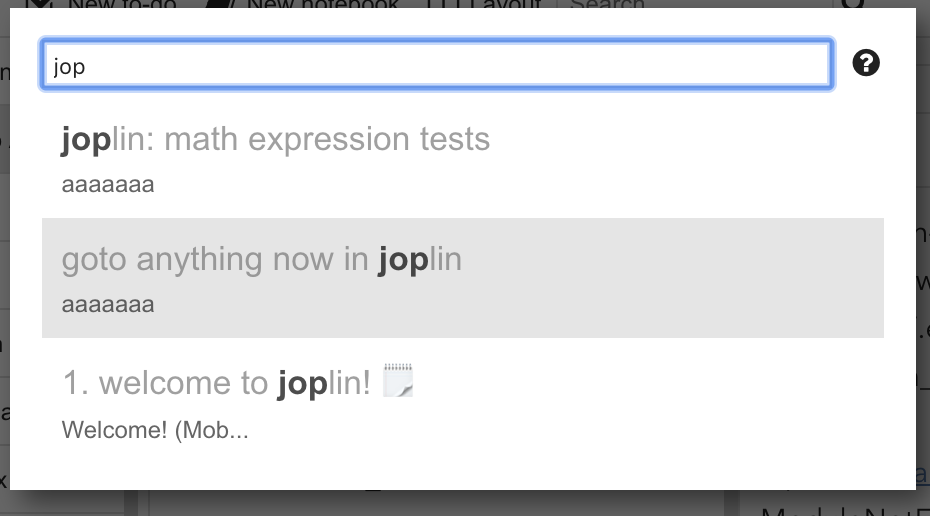
The second major new feature is the addition of the Goto Anything dialog. Press Ctrl+P or Cmd+P and type the title of a note to jump directly to it. You can also type # followed by a tag or @ followed by a notebook title. The feature was largely inspired by the cool Sublime Text Goto Anything feature.

· 2 minutes de lecture

The original search engine in Joplin was pretty limited - it would search for your exact query and that is it. For example if you search for "recipe cake" it would return results that contain exactly this word in this order and nothing else - it would not return "apple cake recipe" or "recipe for birthday cake", thus forcing you to try various queries.

The last versions of Joplin include a new search engine that provides much better results, and also allow better specifying search queries.

The search engine indexes in real time the content of the notes, thus it can give back results very fast. It is also built on top of SQLite FTS and thus support all its queries. Unlike the previous search engine, the new one also sorts the results by relevance.

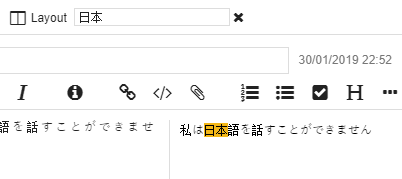
The first iteration of this new search engine was a bit limited when it comes to non-English text. For example, for searching text that contains accents or non-alphabetical characters. So in the last update, better support for this was also added - accentuated and non-accentuated characters are treated in the same way, and languages like Russian, Chinese, Japanese or Korean can be searched easily.

This search engine is still new so it is likely to change over time. For example, ordering the results by relevance is a bit experimental, and some edge cases might not work for non-English language queries. If you notice any issue, feel free to report it on the forum or GitHub. The new search engine is in use in both the mobile and desktop application.

· 2 minutes de lecture

Joplin is now featured on PrivacyTools.io, a site dedicated to providing knowledge and tools to protect people's privacy against global mass surveillance. The app was kindly submitted by Mats Estensen on GitHub and accepted soon after.

Since day one the Joplin project has indeed been concerned with privacy - offering End To End Encryption and supporting open standards, including WebDAV for synchronisation. Setting up Joplin synchronisation can be more complicated than other existing note applications, but the advantage is that once it is done you 100% own the data and even the infrastructure if you use Nextcloud on your own server.

The applications do not track users, and of course there is not and will never be ads. It also makes very few web requests (outside of synchronisation). In fact only two requests are made, and both can be disabled in the options:

  • One for geolocation tagging, to associate a latitude and longitude with a note.

  • One for the auto-update checks. It makes a request to GitHub to check if a new version has been released.

This endorsement by PrivacyTools is great news for the project. It means more users, and that our efforts to create a privacy-respecting tool are going in the right direction.

· Une minute de lecture

Hacktoberfest has now ended - many thanks to all those who have contributed. Some of the pull requests are not merged yet but they will be soon. For information, this is the number of pull requests per month on the project, so there was approximately a 30% increase in October:

Oct - 26

Sep - 20

Aug - 8

Jul - 3

Jun - 4

May - 18

Again many thanks to all those who have submitted a pull request, your efforts to improve the project are much appreciated!

· Une minute de lecture

The Hacktoberfest event has started - it allows you to contribute to Joplin and, at the end of the month, after having done 5 PR, you'll earn a limited edition T-shirt.

To participate, go on https://hacktoberfest.digitalocean.com/ log in (with you github account) and you are ready to get in.

Next, go dive into the Joplin issues list labelled "Hacktoberfest"

We hope you will enjoy that event by contributing to the project which is a nice moment of sharing good vibe 🎃 🎉

PS: the 5 Pull Request don't have to be done only on Joplin project, those can be done on any FOSS projects.

· Une minute de lecture

Reliability and stability is an important feature of Joplin as the application can potentially manage thousands of notes spanning many years (My oldest note, imported from another software, is from October 1999!). A stable interface without too many glitches also makes for a more pleasant user experience. For these reasons, bug fixes are always given high priority in this project, and are usually worked on before any new feature is added. The latest release for instance pretty much only contains bug fixes - eight of them, including one security fix.

Joplin is not bug free yet, there are still a few issues here and there, that sometimes depend on the user's hardware or configuration, and others that are hard to replicate or fix, but the app is getting there - more stable with each new release.

More information about this release and download link in the changelog - https://joplinapp.org/help/about/changelog/desktop

· Une minute de lecture

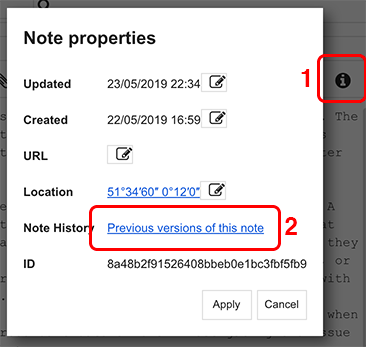
The new desktop version of Joplin for Windows, macOS and Linux features a new dialog box to view and edit the note properties, such as the updated date, created date, source URL or even location. It's a small change but it can be useful. This dialog can be accessed by clicking on the Information icon in the toolbar.

As usual this release also includes various bug fixes and improvements. More information on the changelog: https://joplinapp.org/help/about/changelog/desktop

· Une minute de lecture

The iOS version for iPhone, iPad and iPod sometimes lags behind the Android one due to the App Store release process being more complex. However it eventually catches up, as is the case with the latest release, which includes all the features and bug fixes from the past few months.

In particular a feature that's been needed for a while - the ability to open resources (eg. PDF files or other attachments) in external viewers. That means all that's available in desktop - notes and attachments - is now also fully available on mobile, making the app much more useful. In this release there are also quite a few optimisations to the sync process so in some cases it should be faster, as well as better support for WebDAV. Finally there are various small fixes and improvements, such as support for SVG vector graphics, improved math formula support, etc.

All these improvements are also found in the recently released macOS, Windows, Linux and Android versions.

· Une minute de lecture

One of the most requested feature, the Web Clipper, is now available on the Firefox and Chrome store. It is possible to save a whole web page, or a simplified version of it, or a screenshot directly from the browser to Joplin. Like the rest of Joplin, the HTML page will be converted to Markdown, which means it can be easily edited and read even without a special viewer, and, since it's plain text, it also makes it easier to search and share the content.

Have a look at the Web Clipper documentation for more information.