
Helping you ditch the markdown viewer for good.

This plugin allows you to create and use templates in Joplin.

Create and manage Kanban boards from Joplin

Write TODOs *everywhere* and view them in one place.
Helping you ditch the markdown viewer for good.
This plugin allows you to create and use templates in Joplin.
Create and manage Kanban boards from Joplin
Write TODOs *everywhere* and view them in one place.
Create links to other notes

Line numbers, code folding, space highlighting, word count, and other options for the CodeMirror 6 editor.

Allows to open several notes at once in tabs and pin them.

Turn your notes into a powerful calculator with inline math.

Shows differences between notes. This plugin can be used to resolve conflicts and compare related notes.

Combine one or more notes
Format the table under the cursor in Markdown editor

Pagination, font family and size customization for Joplin's Markdown viewer. Supports mobile and desktop. (Beta).

Monitors a locale folder and import the files as a new note.


A note overview is created based on the defined search and the specified fields.
A plugin that makes process of resolving conflicts easier.

Plugin to create manual and automatic backups.

Displays a note preview in the note list

Create and edit drawings with js-draw.
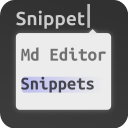
Exposes CodeMirror 6's built-in support for autocompletion and snippets.

Adds support for local CSS @imports and @importing CSS from notes.
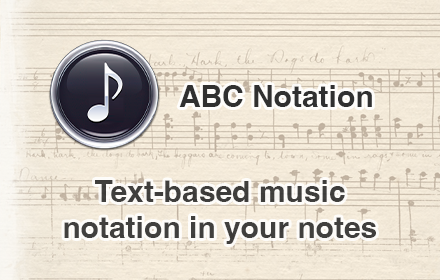
Turns ABC text notation into sheet music
Turn notes into slideshows with reveal.js!

A panel with information about the current note and an advanced search tool.

Victor can be used to clear all your data - notes, notebooks, attachments, tags, etc. Convenient to start over.
Configure CodeMirror‘s Vim emulation with a very-limited, vimrc-like file.
Copy/Show the ID of a notebook. For developers. A regular user won't need this.
Helping you ditch the markdown viewer for good.
This plugin allows you to create and use templates in Joplin.
Create and manage Kanban boards from Joplin
Write TODOs *everywhere* and view them in one place.
Outline (TOC) sidebar plugin for joplin.
Create links to other notes
Line numbers, code folding, space highlighting, word count, and other options for the CodeMirror 6 editor.

Joplin AI assistant running a very intelligent system (GPT, Claude, Gemini, Ollama, Hugging Face, ...), including: related notes (semantic search), chat with LLMs and your notes, prompt templates, auto-tags and more.
Allows to open several notes at once in tabs and pin them.
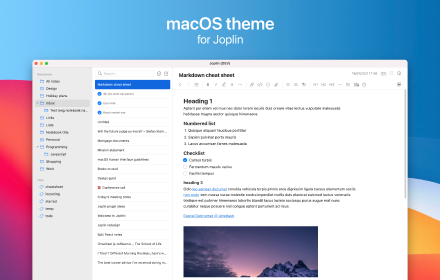
Native looking macOS theme for Joplin. Also works on non-macOS devices.
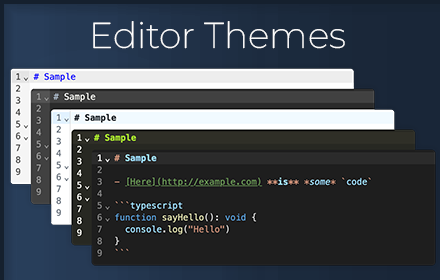
70+ editor themes, including VSCode, GitHub, and Sublime
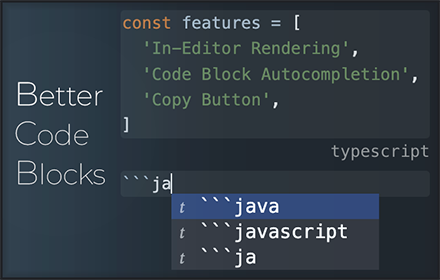
Enhances code blocks with inline rendering, autocompletion, and more!
A simple calendar to show notes created on each day.
Turn your notes into a powerful calculator with inline math.
A simple journal. Create or open a note for today, or any selected date.
Shows differences between notes. This plugin can be used to resolve conflicts and compare related notes.
Save any notebook, note, to-do, tag, or search as favorite in an extra panel view for quick access.
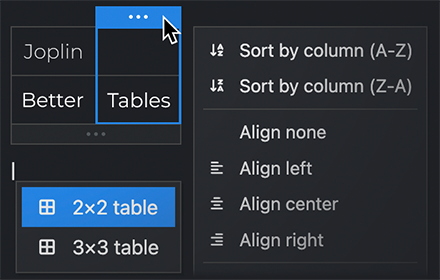
Powerful interactive table editor for Joplin notes
Combine one or more notes

Add a copy button to the code blocks.
Format the table under the cursor in Markdown editor
Pagination, font family and size customization for Joplin's Markdown viewer. Supports mobile and desktop. (Beta).
Enhance the markdown editor with live preview for math, mermaid, link, image, and more. It also includes other features for markdown rendering.

Easily manage and schedule projects, integrating tasks directly with your knowledge base.

Keeps your Joplin notes safe with password and encryption.
Easily apply color to text.
Create collapsible blocks with title and extendable body, and make headings collapsible too.
Monitors a locale folder and import the files as a new note.
Draw.io (aka Diagram.net) integration for Joplin
Visualize the connections between Joplin notes.

Your very own AI-powered note plugin. It's completely open-source and does not collect any logs or personal information.
Make your code blocks look perfect! Support for displaying code block line numbers, support for one-click copying.
A collection of tools to make editing tables easier. Also supports GitHub Flavored Markdown!

Generate a mindmap using markmap
Add colors to markdown table syntax and help distinguishing different columns
A note overview is created based on the defined search and the specified fields.
A plugin that makes process of resolving conflicts easier.
Fetch your important emails as notes.

A simple dialogue to switch image syntax between markdown/html and losslessly resize images
Plugin to create manual and automatic backups.
Creates backlinks to opened note, also in automatic way
Displays a note preview in the note list

A panel to make the to-do-viewing experience slightly nicer.
Sort rendered tables on the fly and apply it to markdown source text. Can recognize simple cases of number, money, date and sort accordingly.
Recent notes, shortcuts, scratchpad, and .... in a single sidebar.
Mindmap Plugin, i18n seven languages, Import Xmind|MindManager|json|md, Export json|png|md
A complete Link System for Joplin. Referrer(aka. backlink), Quick Link, Copy Anchor, Hover to preview, Url Icon, and much more feature
A lightweight backlinks plugin.
Notes as nodes. Explore your Joplin knowledge graph.

Joplin theme with colors of GitHub
Create bidirectional to other notes
Excalidraw in Joplin

Allows you to copy text with HTML (rich text) formatting from the markdown editor (including images). Also allows you to copy as plain text (without markdown formatting)
Import your Google Keep notes to Joplin
Plugin to open a choosen note each time joplin starts. It is like homepages on browsers.
Life Calendar Plugin for Joplin
A powerful and comprehensive plugin for to-do repetition/recurrence
This plugin provides an autocomplete feature for emojis in Joplin's Markdown editor.
Enhanced CodeMirror 6 theme with styling for headings, code, links, GitHub alerts, blockquotes, and table rendering. Includes keyboard shortcuts for heading levels (Ctrl+1-6), inline math notation (Ctrl+$), and comprehensive table editing tools.

Adds a search and replace panel to the Markdown editor.
Enables markdownIt admonition plugin, which enables formatting notes
Create and edit drawings with js-draw.
Link Zotero entries in notes
Exposes CodeMirror 6's built-in support for autocompletion and snippets.

Github Alerts or callouts, are a Markdown extension based on the blockquote syntax that you can use to emphasize critical information. They are displayed with distinctive colors and icons to indicate the significance of the content.
Kity Minder Mindmap Tools 思维导图(脑图插件)
Render PlantUML diagram inside your Joplin notes.
Adds support for local CSS @imports and @importing CSS from notes.
Create text spans which are click-to-copy.
use to write excalidraw in Joplin
JSheets - use to write spreadsheets like excel in Joplin

Paste HTML formatted text as markdown
Make markdown table easy
Execute several utilities by typing a command that starts with a slash.
Turns ABC text notation into sheet music

Handle some bulk operations that Joplin itself does not support and present them in a visual interface.
Create dynamic tables based on frontmatter in your notes.
Flexible kanban board plugin for all your tasks
Turn notes into slideshows with reveal.js!
Integrating Joplin with a self-hosted AI platform like Open WebUI
Given a youtube video id or url, it inserts at the cursor position a video link

Quickly jot down notes on startup or with a shortcut.

Add support for GitHub-style alerts (callouts) in the markdown editor/viewer, plus editor commands for alerts, blockquotes, and inline formatting (strikethrough, highlight, underline, superscript, subscript).
Imports a Csv file or pastes a Csv text from Clipboard as table
Adds [[wikilinks]] support to the Markdown editor and preview pane.
Type inline tags or frontmatter in the note editor. View your tagged paragraphs and tasks / TODOs in a search panel, or in a generated note / kanban. Build a table view / database from notes and tags. Convert between Obsidian tags and Joplin tags.

VS Code/Sublime text style overlay panel to navigate through headings in the markdown editor
Joplin note browsing history
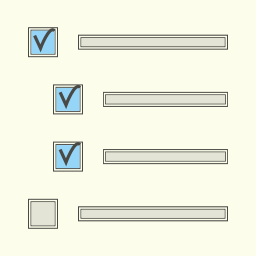
This plugin allows generating the table of contents related to a specific note, where each item has a checkbox. Especially useful for students, as it helps to keep track of topics and distinguish those learned from those not yet learned.

Visualize connections between notes in Joplin.
An AI-powered assistant for your Joplin workspace that lets you chat with your notes, summarize content, and generate new ideas.
Adds a button to insert the current date (without time) into the editor.
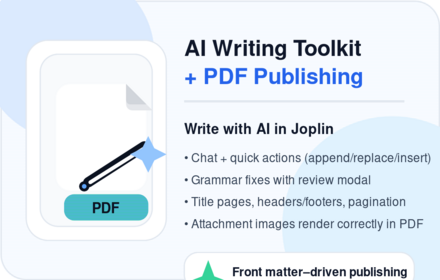
Deeply integrated AI and PDF Publishing tool for Joplin: chat, rewriting, research and grammar tools that work directly with your notes (send prompts with note context, insert/append/replace results). Sophisticated PDF publishing workflow to turn notes into beautiful documents—per-note front matter settings, title pages, headers/footers, pagination, and reliable print preview (including attachment images).
Save the editor layout (editor/split view/viewer/rich text) for each note separately with custom tags.
Allows to fold parts of markdown text displayed in editor
Format your markdown by prettier
A simple event calendar

Adds context menu options in the markdown editor related to links, images, task lists and code
Calendar plugin for Joplin
Indent paragraphs with spaces instead of tabs
Plugin for automatic calculations of markdown table formulas.
Create inline spoilers and spoiler blocks with title and extendable body.
Creates a nightly journal note summarising all notes and todos updated or completed that day, organised under a configurable Journal notebook hierarchy.
A panel with information about the current note and an advanced search tool.
Use a font available from Google Fonts to style the text selected in the editor.
Adds an icon to the toolbar. When clicked, it creates a link to the note with a title matching the selected text.
Adds shortcuts to increase/decrease font size
Highlight/dehighlight the selected text
Send a note as an email
A plugin that helps with managing embedded todo lists in notes, and parses note tags to schedule recurring items.
A time tracker with logs stored and synced in Joplin notes.
Collection of commands to quickly move notes to other notebooks.
Change the capitalization of selected text, and case-insensitive sorting
An enhanced editing plugin for Joplin.
Keep Cursor Synced Between Editor and MD Viewer
Adds the DocX format to Joplin using the Pandoc Document Converter

Transcribes attached audio files using the OpenAI or Google Gemini APIs and creates a transcription note with the press of a button.
Enables line numbers for CodeMirror editor
This plugin aim to enhance joplin experience by llm power.
Uses a user-defined hotstring-and-hotkey dictionary to replace hotstrings in any note with replacement strings of the user's choice. To start using the plugin, make a new note and enter '!!!HOTSTRINGS!!!' as its top line.
A Simple Task Manager Plugin for Joplin based on Todo.txt Specification

Auto-Completes code fences in the markdown editor (with optional dropdown for language auto-complete)
Enable and disable line wrap in the editor or in the viewer
A joplin plugin which will lock joplin app screen when it is idle.
Victor can be used to clear all your data - notes, notebooks, attachments, tags, etc. Convenient to start over.
Use locally stored BibTeX files to integrate citation into Joplin
Converts highlighted text to new one in same folder
This plugin adds an icon to the toolbar. When clicked, it makes a review of the day's created/updated/completed notes and todos.
Provides a search UI panel patterned after VS Code, with matches per note and per-match hit highlighting
Search selected text on GPT-4o model.
A simple utility to track word count and estimated reading time.

A Joplin plugin to provide table rendering and table editing in the Markdown editor.
Use blockquote syntax to display the perfect hint block.
A plugin to reset all checkboxes in a file.
Record audio and insert it into a note.
Visualizes direct and indirect dependencies of a note as a graph.
Transforms a markdown or csv table into an HTML chart
A joplin plugin, encrypt selected notes on the joplin desktop client. This plugin will modify the notes according to your instructions, please read the precautions before use.
Import files from import a folder into joplin notebook as notes mit metadata (PDF text in note comment, no OCR)
Marks words that match the highlighted selection
Flexible JSON-based query summaries for TODOs with filtering, sorting, and grouping.
Allows you to create a tasks in Todoist from Joplin and add it to your current note. A link to the Todoist task will be included in the note. A link to the note will be included in the Todoist task.
encode and decode sensitive string with user password.
Go to tag,notebook or note via links or via text
Plugin to get note statistics
A plugin used to paste special text into Joplin
Simple plugin to export your current note as an MD file to the directory of your choice
Adds menu items, keyboard shortcuts and toolbar buttons to the WYSIWIG editor toolbar to apply headings level 4 to 6
This plugin add several icons next to the note headings that you can click on to copy markdown link of the specific heading.
使用pandoc将 Markdown 笔记导出为 Word 文档,支持图片和模板
Inserts a piece of code from code source
Display the icons for links in your Joplin notes.
Your attachment updater. Mass replacement of Joplin attachments (resources) such as resized image files, current music playlists, and any other attachments you need to one-off or regularly update within Joplin.
Configure CodeMirror‘s Vim emulation with a very-limited, vimrc-like file.
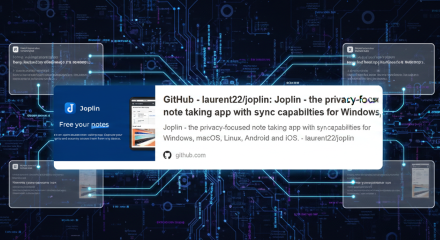
Create a nice looking Card from a URL containing the title, description and image of the URL.
Generate static blog website from your picked Joplin notes, and publish to Github Pages, with a few mouse clicks. Support preview in local
A Joplin plugin for the creation and management of DnD 5e Character Sheets
Extract specific paragraphs out of Joplin notes using keywords, hashtags or custom tags
Disables the markdown renderer / PDF preview (and export) and WYSIWYG editor in Joplin for better performance
display disk usage of resources for notebooks and notes
Render Typogram diagrams inside your Joplin notes.
Adds entry to right click menu in editor to get link to active note

Creates an HTTP URL to open a note in Joplin.

Scales recipes to desired serving counts and displays helpful information in beautiful info cards.

Scan and import files directly from your phone
Convert all octothorpe prefixed words into tags
Publish/Share notes to the web using github gist. Allows for easy sharing of individual notes. Readers can comment using the gist systems
Allows users to summarize their notes and notebooks with AI
Automatically opens your diary for you every day.
Simple plugin to export your current note as an MD file to the directory and Commit to Git (modify at Save Note to MD (joshchavez.dev) )
Joplin plugin based on Function Plot library to render function such as y = x * x

This detects verse references in a note and displays the verse text in a side panel from the New World Translation Bible. There are also actions to insert the verse text into your note and to open the verse directly in jw.org or jw library.
Implements copy and paste command for notes and notebooks
Selected Text to Web Google Search
render the timeline in the markdown
A utility for changing the titles of many notes at once via prefixes, suffixes, or search and replace.
Natural language entry of alarm date/times

Publish Joplin notes to GitHub and automate build deployment through GitHub Actions
Insert the link of tags at the footer automatically
Display whitespaces in editor
Adds to the View menu a command to toggle between WYSIWIG and Markdown editors, with a keyboard shortcut

Adds a button to each code block in Joplin Markdown to copy its content.
CodeMirror
This plugin adds an icon to the toolbar. When clicked, it completes the selected text into a note title (in a markdown link).
Searches the current note for mentions of other notes, then makes the corresponding links. Just click the new icon in the toolbar.
A plugin to create variables that can be accesed through all the notes.

Starts a new note in a default folder using a shortcut (ctrl-o)

This plugin will periodically pull public available markdown documents into your notebook and keeps them up to date
Joplin plugin to rename note attachments,
Link bible verses to bible verse references in editor
TimeWise Counter is a plugin that continually calculates and displays the time remaining until a specified deadline or the time elapsed since a specified start date.
Create paginated 2-column documents in joplin.
A unified sidebar that displays notebooks and notes together in a single tree view
Imports a Calibre Db into (Sub-) Notebook. Also includes a content plugin supporting attributes (see documentation)
Finds blocks of javascript in the current note (blocks have to start with '```javascript' and end with '```') and runs it as a function.
Replace Evernote links in Joplin
Retrieve Atlassian Jira issues information using their api in order to track the status of them from your Joplin notes.
Opens a random note from your workspace
Import your Todoist data into Joplin
Quote the bible direct in text editor
这款专为Joplin笔记软件打造的插件,能够将Joplin中的笔记本目录精准映射到系统指定根目录下的同路径目录。借助该插件,用户可直接从 Joplin 笔记本跳转至对应的系统文件夹,轻松实现笔记目录管理与系统文件夹管理的深度融合,显著提升工作效率。
Export a collection of notes to static site generator project.
Typesets pseudocode beautifully in Joplin.
Allows to remove images from selected note
Copy Universal Web Link
Bidirectional sync between Joplin and Anki
Render WaveDrom diagrams inside your Joplin notes.
Plugin for creating block-level containers with classes for customization
Resize the preview in the markdown mode

外部编辑器不导出笔记标题和增强导入和导出对yaml元数据的支持
Show user which notes are semantically similar to the one they are looking at
Copy/Show the ID of a notebook. For developers. A regular user won't need this.
Add an option to trigger the synchronization after editing a note.
encode and decode sensitive string with user password.
Add support for bytefield-svg diagrams used to describe network protocols, memory layouts and any other binary structure.
Selected Text to ToWebSearchEngine
Notebook Navigate from Current opend Note
Renders chordpro in preview, and provides syntax highlighting for chordpro files in the Joplin markdown editor.

Sync Joplin notes with Google Docs
An AI-powered tag suggestion tool that analyzes note content to recommend relevant tags. Users can select from the suggestions and apply them to their notes, streamlining the organization process.
Sends snippet of text to any other note from any notebook
A Discord Rich Presence Plugin For Joplin
Switch to designated notes using keyboard shortcuts
Add bullets to all newlines in a note. Joplin options 'Opt-in to editor beta' is required for this to work.

Provides interactive input support for math formulae via Katex
A Joplin plugin for custom links, like `jump://?query=blabla`.
Delete folder and notes without confirmation
To implement Inkdrop like Status feature in Joplin
A Joplin plugin that helps find easily in which notes you spoke about a Bible reference.
Create notes as bulk
Opens a random note from your vault
Open source URL of the current note with a shortcut

Import ChatGPT conversation archives (ZIP exports) into Joplin as notes, with support for images, audio, and video attachments
hotkey in joplin
Copies selected text or entire notes in Jira markup to the clipboard
将joplin在记笔记的同时,变成一个网文小说阅读器,a chinese net literature downloader and reader plugin for joplin.
Delete notes without confirmation
A Joplin plugin for WakaTime
Reveal current note in navigation

Help user store and view chess PGN file
通过邮件发送笔记
Commands that insert appropriate <ruby> and <rt> tags to formatted text to display furigana.
Transform Bible Chapters
Import your daily ActivityWatch logs in a readable format
Keep syncing with your ReadCube Papers library, help you create a note for one paper and render the paper note with a formatted paper information table, automatically generate markdown style reference, and allow you to insert your annotations into the note
Quick share notes on HackMD. Hackmd共享笔记, 原项目(https://github.com/xardbaiz/joplin-plugin-hackmd/)
Monitor and automatically add hypothesis annotations to your joplin notebooks
Add an option to trigger the synchronization after editing a note.
Sync your Readwise highlights to Joplin. Creates one note per book with all highlights, and automatically syncs in the background.
Quick share notes on HackMD
Sync articles and highlights from Omnivore to Joplin
jTab
A Joplin plugin for rendering guitar tablature using VexTab
Export notes to NotesOn
Makes numbers in bible verses superscript and bolded and remove footnotes
This plugin imports notes from QNAP Notes Station
Suppress linebreaks between CJK characters
A panel that lets you filter notebooks by name while preserving the tree structure.

Accumulate lootboxes while completing todo notes
Plugin for Simsapa Dhamma Reader. Open a sidebar or double-click to lookup Pāli words in the dictionary, or search in the suttas.
My own Joplin

Sync your notes from your Supernote device into Joplin
first plugin
Resume your work exactly where you left off: remembers cursor positions, and returns to your last note when opening notebooks or the app. Features a customisable home note and automatic editor toggling on mobile.
Helping you ditch the markdown viewer for good.
70+ editor themes, including VSCode, GitHub, and Sublime
Powerful interactive table editor for Joplin notes
Add a copy button to the code blocks.
Format the table under the cursor in Markdown editor
Enhance the markdown editor with live preview for math, mermaid, link, image, and more. It also includes other features for markdown rendering.
Displays a note preview in the note list
Github Alerts or callouts, are a Markdown extension based on the blockquote syntax that you can use to emphasize critical information. They are displayed with distinctive colors and icons to indicate the significance of the content.
Add support for GitHub-style alerts (callouts) in the markdown editor/viewer, plus editor commands for alerts, blockquotes, and inline formatting (strikethrough, highlight, underline, superscript, subscript).
Adds [[wikilinks]] support to the Markdown editor and preview pane.
A Joplin plugin to provide table rendering and table editing in the Markdown editor.
Display the icons for links in your Joplin notes.
Create a nice looking Card from a URL containing the title, description and image of the URL.
Scales recipes to desired serving counts and displays helpful information in beautiful info cards.
Adds a button to each code block in Joplin Markdown to copy its content.
A unified sidebar that displays notebooks and notes together in a single tree view
Imports a Calibre Db into (Sub-) Notebook. Also includes a content plugin supporting attributes (see documentation)
Add support for bytefield-svg diagrams used to describe network protocols, memory layouts and any other binary structure.
A panel that lets you filter notebooks by name while preserving the tree structure.
Accumulate lootboxes while completing todo notes
Enhances code blocks with inline rendering, autocompletion, and more!
A panel with information about the current note and an advanced search tool.
Auto-Completes code fences in the markdown editor (with optional dropdown for language auto-complete)
Victor can be used to clear all your data - notes, notebooks, attachments, tags, etc. Convenient to start over.
This plugin will periodically pull public available markdown documents into your notebook and keeps them up to date
A Joplin plugin for WakaTime
This plugin allows you to create and use templates in Joplin.
Create and manage Kanban boards from Joplin
Write TODOs *everywhere* and view them in one place.
Outline (TOC) sidebar plugin for joplin.
Create links to other notes
Joplin AI assistant running a very intelligent system (GPT, Claude, Gemini, Ollama, Hugging Face, ...), including: related notes (semantic search), chat with LLMs and your notes, prompt templates, auto-tags and more.
Allows to open several notes at once in tabs and pin them.
Enhances code blocks with inline rendering, autocompletion, and more!
A simple calendar to show notes created on each day.
Turn your notes into a powerful calculator with inline math.
A simple journal. Create or open a note for today, or any selected date.
Shows differences between notes. This plugin can be used to resolve conflicts and compare related notes.
Powerful interactive table editor for Joplin notes
Combine one or more notes
Add a copy button to the code blocks.
Format the table under the cursor in Markdown editor
Easily manage and schedule projects, integrating tasks directly with your knowledge base.
Keeps your Joplin notes safe with password and encryption.
Easily apply color to text.
Monitors a locale folder and import the files as a new note.
Visualize the connections between Joplin notes.
Your very own AI-powered note plugin. It's completely open-source and does not collect any logs or personal information.
Make your code blocks look perfect! Support for displaying code block line numbers, support for one-click copying.
A collection of tools to make editing tables easier. Also supports GitHub Flavored Markdown!
Add colors to markdown table syntax and help distinguishing different columns
A note overview is created based on the defined search and the specified fields.
A plugin that makes process of resolving conflicts easier.
Fetch your important emails as notes.
A simple dialogue to switch image syntax between markdown/html and losslessly resize images
Plugin to create manual and automatic backups.
Creates backlinks to opened note, also in automatic way
A panel to make the to-do-viewing experience slightly nicer.
Sort rendered tables on the fly and apply it to markdown source text. Can recognize simple cases of number, money, date and sort accordingly.
Recent notes, shortcuts, scratchpad, and .... in a single sidebar.
A complete Link System for Joplin. Referrer(aka. backlink), Quick Link, Copy Anchor, Hover to preview, Url Icon, and much more feature
A lightweight backlinks plugin.
Notes as nodes. Explore your Joplin knowledge graph.
Create bidirectional to other notes
Excalidraw in Joplin
Allows you to copy text with HTML (rich text) formatting from the markdown editor (including images). Also allows you to copy as plain text (without markdown formatting)
Plugin to open a choosen note each time joplin starts. It is like homepages on browsers.
Life Calendar Plugin for Joplin
A powerful and comprehensive plugin for to-do repetition/recurrence
This plugin provides an autocomplete feature for emojis in Joplin's Markdown editor.
Link Zotero entries in notes
Exposes CodeMirror 6's built-in support for autocompletion and snippets.
Create text spans which are click-to-copy.
use to write excalidraw in Joplin
Paste HTML formatted text as markdown
Make markdown table easy
Execute several utilities by typing a command that starts with a slash.
Turns ABC text notation into sheet music
Handle some bulk operations that Joplin itself does not support and present them in a visual interface.
Flexible kanban board plugin for all your tasks
Given a youtube video id or url, it inserts at the cursor position a video link
Quickly jot down notes on startup or with a shortcut.
Imports a Csv file or pastes a Csv text from Clipboard as table
Type inline tags or frontmatter in the note editor. View your tagged paragraphs and tasks / TODOs in a search panel, or in a generated note / kanban. Build a table view / database from notes and tags. Convert between Obsidian tags and Joplin tags.
VS Code/Sublime text style overlay panel to navigate through headings in the markdown editor
This plugin allows generating the table of contents related to a specific note, where each item has a checkbox. Especially useful for students, as it helps to keep track of topics and distinguish those learned from those not yet learned.
Visualize connections between notes in Joplin.
An AI-powered assistant for your Joplin workspace that lets you chat with your notes, summarize content, and generate new ideas.
Adds a button to insert the current date (without time) into the editor.
Deeply integrated AI and PDF Publishing tool for Joplin: chat, rewriting, research and grammar tools that work directly with your notes (send prompts with note context, insert/append/replace results). Sophisticated PDF publishing workflow to turn notes into beautiful documents—per-note front matter settings, title pages, headers/footers, pagination, and reliable print preview (including attachment images).
Format your markdown by prettier
A simple event calendar
Adds context menu options in the markdown editor related to links, images, task lists and code
Calendar plugin for Joplin
Plugin for automatic calculations of markdown table formulas.
Create inline spoilers and spoiler blocks with title and extendable body.
Creates a nightly journal note summarising all notes and todos updated or completed that day, organised under a configurable Journal notebook hierarchy.
A panel with information about the current note and an advanced search tool.
Use a font available from Google Fonts to style the text selected in the editor.
Highlight/dehighlight the selected text
Send a note as an email
A time tracker with logs stored and synced in Joplin notes.
Collection of commands to quickly move notes to other notebooks.
An enhanced editing plugin for Joplin.
Adds the DocX format to Joplin using the Pandoc Document Converter
Transcribes attached audio files using the OpenAI or Google Gemini APIs and creates a transcription note with the press of a button.
This plugin aim to enhance joplin experience by llm power.
A Simple Task Manager Plugin for Joplin based on Todo.txt Specification
Auto-Completes code fences in the markdown editor (with optional dropdown for language auto-complete)
A joplin plugin which will lock joplin app screen when it is idle.
Victor can be used to clear all your data - notes, notebooks, attachments, tags, etc. Convenient to start over.
Converts highlighted text to new one in same folder
This plugin adds an icon to the toolbar. When clicked, it makes a review of the day's created/updated/completed notes and todos.
A simple utility to track word count and estimated reading time.
A Joplin plugin to provide table rendering and table editing in the Markdown editor.
Use blockquote syntax to display the perfect hint block.
A plugin to reset all checkboxes in a file.
Record audio and insert it into a note.
Visualizes direct and indirect dependencies of a note as a graph.
Transforms a markdown or csv table into an HTML chart
A joplin plugin, encrypt selected notes on the joplin desktop client. This plugin will modify the notes according to your instructions, please read the precautions before use.
Import files from import a folder into joplin notebook as notes mit metadata (PDF text in note comment, no OCR)
Marks words that match the highlighted selection
Flexible JSON-based query summaries for TODOs with filtering, sorting, and grouping.
Allows you to create a tasks in Todoist from Joplin and add it to your current note. A link to the Todoist task will be included in the note. A link to the note will be included in the Todoist task.
Plugin to get note statistics
A plugin used to paste special text into Joplin
Simple plugin to export your current note as an MD file to the directory of your choice
Adds menu items, keyboard shortcuts and toolbar buttons to the WYSIWIG editor toolbar to apply headings level 4 to 6
This plugin add several icons next to the note headings that you can click on to copy markdown link of the specific heading.
使用pandoc将 Markdown 笔记导出为 Word 文档,支持图片和模板
Inserts a piece of code from code source
Your attachment updater. Mass replacement of Joplin attachments (resources) such as resized image files, current music playlists, and any other attachments you need to one-off or regularly update within Joplin.
A Joplin plugin for the creation and management of DnD 5e Character Sheets
Extract specific paragraphs out of Joplin notes using keywords, hashtags or custom tags
display disk usage of resources for notebooks and notes
Adds entry to right click menu in editor to get link to active note
Creates an HTTP URL to open a note in Joplin.
Scales recipes to desired serving counts and displays helpful information in beautiful info cards.
Scan and import files directly from your phone
Publish/Share notes to the web using github gist. Allows for easy sharing of individual notes. Readers can comment using the gist systems
Allows users to summarize their notes and notebooks with AI
Automatically opens your diary for you every day.
Simple plugin to export your current note as an MD file to the directory and Commit to Git (modify at Save Note to MD (joshchavez.dev) )
Joplin plugin based on Function Plot library to render function such as y = x * x
This detects verse references in a note and displays the verse text in a side panel from the New World Translation Bible. There are also actions to insert the verse text into your note and to open the verse directly in jw.org or jw library.
Implements copy and paste command for notes and notebooks
render the timeline in the markdown
A utility for changing the titles of many notes at once via prefixes, suffixes, or search and replace.
Natural language entry of alarm date/times
Adds a button to each code block in Joplin Markdown to copy its content.
This plugin adds an icon to the toolbar. When clicked, it completes the selected text into a note title (in a markdown link).
Searches the current note for mentions of other notes, then makes the corresponding links. Just click the new icon in the toolbar.
A plugin to create variables that can be accesed through all the notes.
Starts a new note in a default folder using a shortcut (ctrl-o)
This plugin will periodically pull public available markdown documents into your notebook and keeps them up to date
Joplin plugin to rename note attachments,
Link bible verses to bible verse references in editor
Create paginated 2-column documents in joplin.
A unified sidebar that displays notebooks and notes together in a single tree view
Finds blocks of javascript in the current note (blocks have to start with '```javascript' and end with '```') and runs it as a function.
Replace Evernote links in Joplin
Opens a random note from your workspace
Quote the bible direct in text editor
这款专为Joplin笔记软件打造的插件,能够将Joplin中的笔记本目录精准映射到系统指定根目录下的同路径目录。借助该插件,用户可直接从 Joplin 笔记本跳转至对应的系统文件夹,轻松实现笔记目录管理与系统文件夹管理的深度融合,显著提升工作效率。
Export a collection of notes to static site generator project.
Allows to remove images from selected note
Copy Universal Web Link
Bidirectional sync between Joplin and Anki
Plugin for creating block-level containers with classes for customization
Copy/Show the ID of a notebook. For developers. A regular user won't need this.
Add an option to trigger the synchronization after editing a note.
Notebook Navigate from Current opend Note
Sends snippet of text to any other note from any notebook
Switch to designated notes using keyboard shortcuts
Provides interactive input support for math formulae via Katex
A Joplin plugin for custom links, like `jump://?query=blabla`.
Delete folder and notes without confirmation
To implement Inkdrop like Status feature in Joplin
A Joplin plugin that helps find easily in which notes you spoke about a Bible reference.
Create notes as bulk
Opens a random note from your vault
Open source URL of the current note with a shortcut
hotkey in joplin
Copies selected text or entire notes in Jira markup to the clipboard
Delete notes without confirmation
A Joplin plugin for WakaTime
通过邮件发送笔记
Commands that insert appropriate <ruby> and <rt> tags to formatted text to display furigana.
Quick share notes on HackMD. Hackmd共享笔记, 原项目(https://github.com/xardbaiz/joplin-plugin-hackmd/)
Monitor and automatically add hypothesis annotations to your joplin notebooks
Add an option to trigger the synchronization after editing a note.
Sync your Readwise highlights to Joplin. Creates one note per book with all highlights, and automatically syncs in the background.
Quick share notes on HackMD
Sync articles and highlights from Omnivore to Joplin
A Joplin plugin for rendering guitar tablature using VexTab
Export notes to NotesOn
Makes numbers in bible verses superscript and bolded and remove footnotes
This plugin imports notes from QNAP Notes Station
Suppress linebreaks between CJK characters
Accumulate lootboxes while completing todo notes
Sync your notes from your Supernote device into Joplin
Native looking macOS theme for Joplin. Also works on non-macOS devices.
70+ editor themes, including VSCode, GitHub, and Sublime
Displays a note preview in the note list
Joplin theme with colors of GitHub
Enhanced CodeMirror 6 theme with styling for headings, code, links, GitHub alerts, blockquotes, and table rendering. Includes keyboard shortcuts for heading levels (Ctrl+1-6), inline math notation (Ctrl+$), and comprehensive table editing tools.
Joplin AI assistant running a very intelligent system (GPT, Claude, Gemini, Ollama, Hugging Face, ...), including: related notes (semantic search), chat with LLMs and your notes, prompt templates, auto-tags and more.
Generate a mindmap using markmap
A plugin that makes process of resolving conflicts easier.
Mindmap Plugin, i18n seven languages, Import Xmind|MindManager|json|md, Export json|png|md
Import your Google Keep notes to Joplin
Kity Minder Mindmap Tools 思维导图(脑图插件)
Render PlantUML diagram inside your Joplin notes.
JSheets - use to write spreadsheets like excel in Joplin
Turn notes into slideshows with reveal.js!
This plugin allows generating the table of contents related to a specific note, where each item has a checkbox. Especially useful for students, as it helps to keep track of topics and distinguish those learned from those not yet learned.
Adds an icon to the toolbar. When clicked, it creates a link to the note with a title matching the selected text.
A plugin that helps with managing embedded todo lists in notes, and parses note tags to schedule recurring items.
Transcribes attached audio files using the OpenAI or Google Gemini APIs and creates a transcription note with the press of a button.
Use locally stored BibTeX files to integrate citation into Joplin
Allows you to create a tasks in Todoist from Joplin and add it to your current note. A link to the Todoist task will be included in the note. A link to the note will be included in the Todoist task.
encode and decode sensitive string with user password.
Render Typogram diagrams inside your Joplin notes.
Creates an HTTP URL to open a note in Joplin.
Scan and import files directly from your phone
Publish Joplin notes to GitHub and automate build deployment through GitHub Actions
Display whitespaces in editor
TimeWise Counter is a plugin that continually calculates and displays the time remaining until a specified deadline or the time elapsed since a specified start date.
Retrieve Atlassian Jira issues information using their api in order to track the status of them from your Joplin notes.
Import your Todoist data into Joplin
Typesets pseudocode beautifully in Joplin.
Render WaveDrom diagrams inside your Joplin notes.
encode and decode sensitive string with user password.
Selected Text to ToWebSearchEngine
Renders chordpro in preview, and provides syntax highlighting for chordpro files in the Joplin markdown editor.
Sync Joplin notes with Google Docs
Add bullets to all newlines in a note. Joplin options 'Opt-in to editor beta' is required for this to work.
Import ChatGPT conversation archives (ZIP exports) into Joplin as notes, with support for images, audio, and video attachments
将joplin在记笔记的同时,变成一个网文小说阅读器,a chinese net literature downloader and reader plugin for joplin.
A Joplin plugin for WakaTime
Reveal current note in navigation
Transform Bible Chapters
Import your daily ActivityWatch logs in a readable format
Keep syncing with your ReadCube Papers library, help you create a note for one paper and render the paper note with a formatted paper information table, automatically generate markdown style reference, and allow you to insert your annotations into the note
Sync your Readwise highlights to Joplin. Creates one note per book with all highlights, and automatically syncs in the background.
jTab
Plugin for Simsapa Dhamma Reader. Open a sidebar or double-click to lookup Pāli words in the dictionary, or search in the suttas.
My own Joplin
Sync your notes from your Supernote device into Joplin
first plugin
Turn your notes into a powerful calculator with inline math.
Pagination, font family and size customization for Joplin's Markdown viewer. Supports mobile and desktop. (Beta).
Easily manage and schedule projects, integrating tasks directly with your knowledge base.
Displays a note preview in the note list
Adds support for local CSS @imports and @importing CSS from notes.
Create dynamic tables based on frontmatter in your notes.
Add support for GitHub-style alerts (callouts) in the markdown editor/viewer, plus editor commands for alerts, blockquotes, and inline formatting (strikethrough, highlight, underline, superscript, subscript).
This plugin allows generating the table of contents related to a specific note, where each item has a checkbox. Especially useful for students, as it helps to keep track of topics and distinguish those learned from those not yet learned.
Save the editor layout (editor/split view/viewer/rich text) for each note separately with custom tags.
Keep Cursor Synced Between Editor and MD Viewer
Enable and disable line wrap in the editor or in the viewer
Typesets pseudocode beautifully in Joplin.
Help user store and view chess PGN file
Joplin AI assistant running a very intelligent system (GPT, Claude, Gemini, Ollama, Hugging Face, ...), including: related notes (semantic search), chat with LLMs and your notes, prompt templates, auto-tags and more.
Allows to open several notes at once in tabs and pin them.
Save any notebook, note, to-do, tag, or search as favorite in an extra panel view for quick access.
Adds a search and replace panel to the Markdown editor.
Integrating Joplin with a self-hosted AI platform like Open WebUI
Type inline tags or frontmatter in the note editor. View your tagged paragraphs and tasks / TODOs in a search panel, or in a generated note / kanban. Build a table view / database from notes and tags. Convert between Obsidian tags and Joplin tags.
Joplin note browsing history
A panel with information about the current note and an advanced search tool.
Provides a search UI panel patterned after VS Code, with matches per note and per-match hit highlighting
Search selected text on GPT-4o model.
Selected Text to Web Google Search
Show user which notes are semantically similar to the one they are looking at
A panel that lets you filter notebooks by name while preserving the tree structure.
Type inline tags or frontmatter in the note editor. View your tagged paragraphs and tasks / TODOs in a search panel, or in a generated note / kanban. Build a table view / database from notes and tags. Convert between Obsidian tags and Joplin tags.
Go to tag,notebook or note via links or via text
Extract specific paragraphs out of Joplin notes using keywords, hashtags or custom tags
Convert all octothorpe prefixed words into tags
Insert the link of tags at the footer automatically
An AI-powered tag suggestion tool that analyzes note content to recommend relevant tags. Users can select from the suggestions and apply them to their notes, streamlining the organization process.
Helping you ditch the markdown viewer for good.
This plugin allows you to create and use templates in Joplin.
Write TODOs *everywhere* and view them in one place.
Create links to other notes
Line numbers, code folding, space highlighting, word count, and other options for the CodeMirror 6 editor.
70+ editor themes, including VSCode, GitHub, and Sublime
Enhances code blocks with inline rendering, autocompletion, and more!
Turn your notes into a powerful calculator with inline math.
Shows differences between notes. This plugin can be used to resolve conflicts and compare related notes.
Powerful interactive table editor for Joplin notes
Format the table under the cursor in Markdown editor
Create collapsible blocks with title and extendable body, and make headings collapsible too.
Draw.io (aka Diagram.net) integration for Joplin
A plugin that makes process of resolving conflicts easier.
A simple dialogue to switch image syntax between markdown/html and losslessly resize images
Allows you to copy text with HTML (rich text) formatting from the markdown editor (including images). Also allows you to copy as plain text (without markdown formatting)
This plugin provides an autocomplete feature for emojis in Joplin's Markdown editor.
Enables markdownIt admonition plugin, which enables formatting notes
Create and edit drawings with js-draw.
Exposes CodeMirror 6's built-in support for autocompletion and snippets.
Github Alerts or callouts, are a Markdown extension based on the blockquote syntax that you can use to emphasize critical information. They are displayed with distinctive colors and icons to indicate the significance of the content.
Paste HTML formatted text as markdown
Add support for GitHub-style alerts (callouts) in the markdown editor/viewer, plus editor commands for alerts, blockquotes, and inline formatting (strikethrough, highlight, underline, superscript, subscript).
Adds [[wikilinks]] support to the Markdown editor and preview pane.
VS Code/Sublime text style overlay panel to navigate through headings in the markdown editor
This plugin allows generating the table of contents related to a specific note, where each item has a checkbox. Especially useful for students, as it helps to keep track of topics and distinguish those learned from those not yet learned.
Deeply integrated AI and PDF Publishing tool for Joplin: chat, rewriting, research and grammar tools that work directly with your notes (send prompts with note context, insert/append/replace results). Sophisticated PDF publishing workflow to turn notes into beautiful documents—per-note front matter settings, title pages, headers/footers, pagination, and reliable print preview (including attachment images).
Allows to fold parts of markdown text displayed in editor
Adds context menu options in the markdown editor related to links, images, task lists and code
Indent paragraphs with spaces instead of tabs
Adds shortcuts to increase/decrease font size
Change the capitalization of selected text, and case-insensitive sorting
An enhanced editing plugin for Joplin.
Transcribes attached audio files using the OpenAI or Google Gemini APIs and creates a transcription note with the press of a button.
Enables line numbers for CodeMirror editor
Uses a user-defined hotstring-and-hotkey dictionary to replace hotstrings in any note with replacement strings of the user's choice. To start using the plugin, make a new note and enter '!!!HOTSTRINGS!!!' as its top line.
Auto-Completes code fences in the markdown editor (with optional dropdown for language auto-complete)
Enable and disable line wrap in the editor or in the viewer
A Joplin plugin to provide table rendering and table editing in the Markdown editor.
Flexible JSON-based query summaries for TODOs with filtering, sorting, and grouping.
Configure CodeMirror‘s Vim emulation with a very-limited, vimrc-like file.
Generate static blog website from your picked Joplin notes, and publish to Github Pages, with a few mouse clicks. Support preview in local
Disables the markdown renderer / PDF preview (and export) and WYSIWYG editor in Joplin for better performance
Scales recipes to desired serving counts and displays helpful information in beautiful info cards.
Adds to the View menu a command to toggle between WYSIWIG and Markdown editors, with a keyboard shortcut
CodeMirror
Resize the preview in the markdown mode
外部编辑器不导出笔记标题和增强导入和导出对yaml元数据的支持
Notebook Navigate from Current opend Note
A Discord Rich Presence Plugin For Joplin
Provides interactive input support for math formulae via Katex
Resume your work exactly where you left off: remembers cursor positions, and returns to your last note when opening notebooks or the app. Features a customisable home note and automatic editor toggling on mobile.
Keeps your Joplin notes safe with password and encryption.
Monitors a locale folder and import the files as a new note.
Plugin to create manual and automatic backups.
Scan and import files directly from your phone
Simple plugin to export your current note as an MD file to the directory and Commit to Git (modify at Save Note to MD (joshchavez.dev) )
Imports a Calibre Db into (Sub-) Notebook. Also includes a content plugin supporting attributes (see documentation)
Write TODOs *everywhere* and view them in one place.
Joplin AI assistant running a very intelligent system (GPT, Claude, Gemini, Ollama, Hugging Face, ...), including: related notes (semantic search), chat with LLMs and your notes, prompt templates, auto-tags and more.
Save any notebook, note, to-do, tag, or search as favorite in an extra panel view for quick access.
Easily manage and schedule projects, integrating tasks directly with your knowledge base.
A panel to make the to-do-viewing experience slightly nicer.
Handle some bulk operations that Joplin itself does not support and present them in a visual interface.
Type inline tags or frontmatter in the note editor. View your tagged paragraphs and tasks / TODOs in a search panel, or in a generated note / kanban. Build a table view / database from notes and tags. Convert between Obsidian tags and Joplin tags.
This plugin allows generating the table of contents related to a specific note, where each item has a checkbox. Especially useful for students, as it helps to keep track of topics and distinguish those learned from those not yet learned.
Visualize connections between notes in Joplin.
A utility for changing the titles of many notes at once via prefixes, suffixes, or search and replace.
This plugin will periodically pull public available markdown documents into your notebook and keeps them up to date
A panel that lets you filter notebooks by name while preserving the tree structure.
Sync your notes from your Supernote device into Joplin